
JN0-696 · Question #70
Click the Exhibit button. A customer configured DHCP relay. After committing the configuration, the DHCP server does not provide addresses and you suspect that a configuration is missing. The server…
The correct answer is A. set security zones security-zone trust interfaces ge-0/0/7 host-inbound-traffic system- services C. set security policies from-zone trust to-zone untrust policy DHCP-request match source- address. SRX Getting Started - Configure Global DHCP Relay Service A: Specify DHCP as an allowed inbound service for each interface that is associated with DHCP. In the following example, DHCP is configured as an inbound service for ge-0/0/7. user@host# set security zones security-zone…
Question
Click the Exhibit button. A customer configured DHCP relay. After committing the configuration, the DHCP server does not provide addresses and you suspect that a configuration is missing. The server is connected to ge-0/0/8 and the hosts are connected to ge-0/0/7 through a switch. The server IP address is 192.18.24.38. Referring to the exhibit, which two commands would be used to solve the problem? (Choose two.)
Exhibit
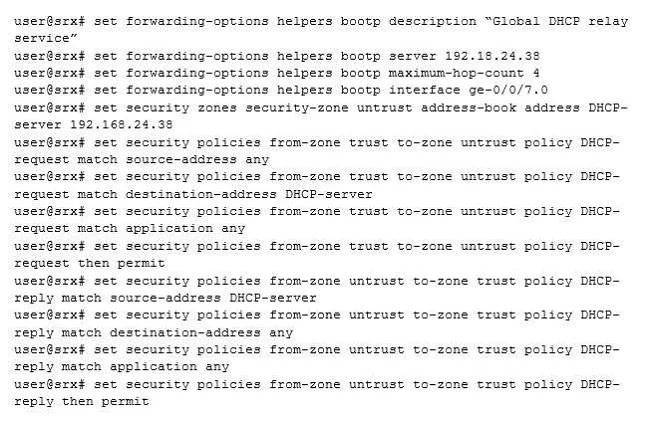
Options
- Aset security zones security-zone trust interfaces ge-0/0/7 host-inbound-traffic system- services
- Bset security policies from-zone untrust to-zone trust policy DHCP-reply match destination-address
- Cset security policies from-zone trust to-zone untrust policy DHCP-request match source- address
- Dset security zones security-zone untrust interfaces ge-0/0/8 host-inboundtraffic system-services
How the community answered
(33 responses)- A82% (27)
- B6% (2)
- D12% (4)
Explanation
SRX Getting Started - Configure Global DHCP Relay Service A: Specify DHCP as an allowed inbound service for each interface that is associated with DHCP. In the following example, DHCP is configured as an inbound service for ge-0/0/7. user@host# set security zones security-zone trust interfaces ge-0/0/7 host-inbound-traffic system-services dhcp C: Make sure that you have a security policy that allows the session from the DHCP server to the DHCP client apart for the policy from trust to untrust. user@host# set security policies from-zone trust to-zone untrust policy DHCP-request match destinationaddress DHCP-server https://kb.juniper.net/InfoCenter/index?page=content&id=KB15755&pmv=print&actp=LIST
Topics
Community Discussion
No community discussion yet for this question.