
JN0-696 · Question #69
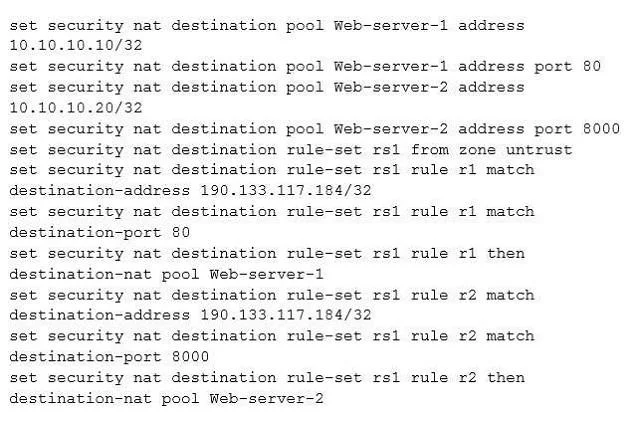
Click the exhibit button. You recently installed two new internal webservers. You configure destination NAT on your SRX Series device so that external users will have access to internal Web…
The correct answer is C. Configure 190.133.117.184/32 under a security zone. An interface for a security zone can be thought of as a doorway through which TCP/IP traffic can pass between that zone and any other zone. Through the policies you define, you can permit traffic between zones to flow in one direction or in both. With the routes that you…
Question
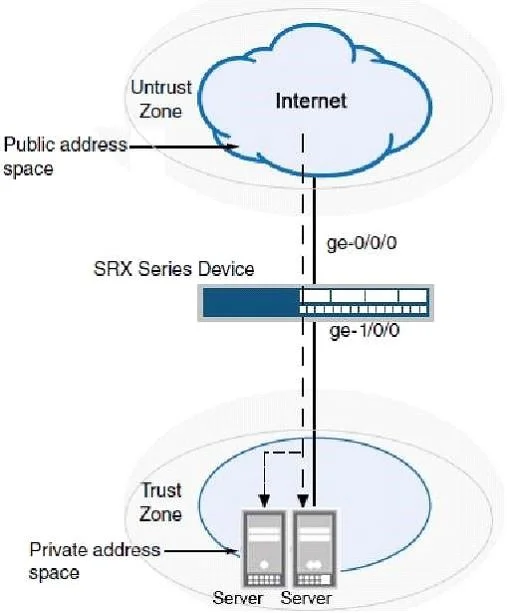
Click the exhibit button. You recently installed two new internal webservers. You configure destination NAT on your SRX Series device so that external users will have access to internal Web resources. However, the external users reported that they still do not have access to the server. Referring to the exhibit, what should you do to solve the problem?
Exhibits
Options
- AConfigure proxy ARP for the address 190.133.117.184/32.
- BContact your ISP since the packets are not reaching the SRX Series device.
- CConfigure 190.133.117.184/32 under a security zone.
- DConfigure a different IP address for the internal servers.
How the community answered
(48 responses)- A6% (3)
- B4% (2)
- C73% (35)
- D17% (8)
Explanation
An interface for a security zone can be thought of as a doorway through which TCP/IP traffic can pass between that zone and any other zone. Through the policies you define, you can permit traffic between zones to flow in one direction or in both. With the routes that you define, you specify the interfaces that traffic from one zone to another must use Note: A security zone is a collection of one or more network segments requiring the regulation of inbound and outbound traffic through policies. Security zones are logical entities to which one or more interfaces are bound. pages/security/securitybasic-zone-interface.pdf
Topics
Community Discussion
No community discussion yet for this question.