
JN0-683 · Question #41
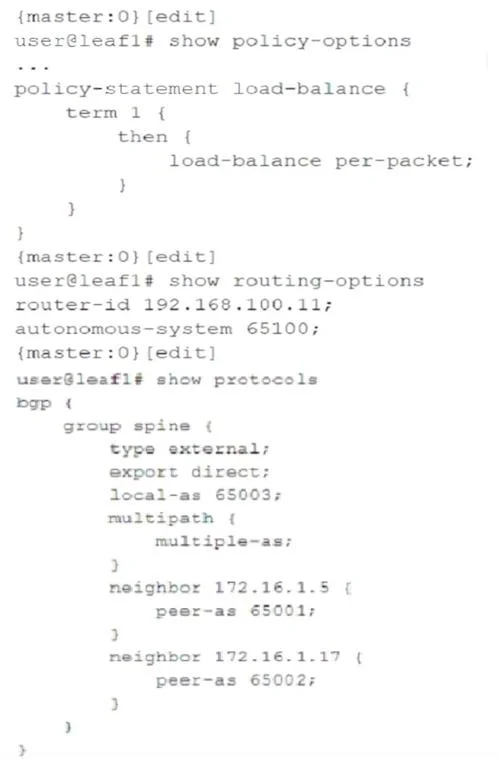
Click the Exhibit button. You are troubleshooting an IP fabric for your data center. You notice that your traffic is not being load balancing to your spine devices from leaf devices. Referring to…
The correct answer is A. The load-balance policy must be applied to the forwarding table under the routing-options. You already have BGP multipath turned on (multiple-as;), so the control plane can install multiple equal-cost routes to the spines. You also created a load-balance policy (load-balance per-packet;). But the traffic is still not being balanced -> because the policy is not…
Question
Click the Exhibit button. You are troubleshooting an IP fabric for your data center. You notice that your traffic is not being load balancing to your spine devices from leaf devices. Referring to the configuration shown in the exhibit, what must be configured to solve this issue?
Exhibit
Options
- AThe load-balance policy must be applied to the forwarding table under the routing-options
- BThe multipast multiple-as configuration must be configured for each peer in the BGP spine group.
- CThe load-balance policy must be applied as an export policy to your BGP.
- DThe load-balance policy must have a from statement that matches on protocol bgp.
How the community answered
(34 responses)- A76% (26)
- B6% (2)
- C3% (1)
- D15% (5)
Explanation
You already have BGP multipath turned on (multiple-as;), so the control plane can install multiple equal-cost routes to the spines. You also created a load-balance policy (load-balance per-packet;). But the traffic is still not being balanced -> because the policy is not applied anywhere. In Junos, per-packet (or per-flow) load-balancing is not decided in BGP. It's decided in the forwarding table (FIB) - the place where the actual packet forwarding That's why Juniper requires you to "attach" your load-balancing policy to the forwarding table.
Topics
Community Discussion
No community discussion yet for this question.