
Juniper
JN0-660 · Question #533
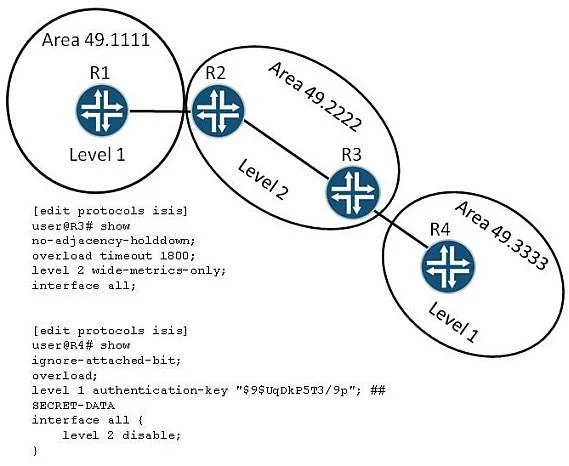
Click the Exhibit button. The exhibit displays an IS-IS topology and an IS-IS configuration for R3 and R4. R4 cannot reach any external destinations or addresses located in Area 49.1111. How would…
Sign in or unlock JN0-660 to reveal the answer and full explanation for question #533. The question stem and answer options stay visible for context.
Question
Click the Exhibit button. The exhibit displays an IS-IS topology and an IS-IS configuration for R3 and R4. R4 cannot reach any external destinations or addresses located in Area 49.1111. How would you ensure that R4 can reach external destinations and addresses located in area 49.1111?
Exhibit
Options
- AConfigure an export policy on R3 that leaks all IS-IS routes from Level 2 to Level 1.
- BConfigure R3's authentication key to match R4's authentication key.
- CRemove the overload statement on R4.
- DRemove the ignore-attached-bit statement on R4.
Unlock JN0-660 to see the answer
You've previewed enough free JN0-660 questions. Unlock JN0-660 for full answers, explanations, the timed quiz mode, progress tracking, and the master PDF. Question stem and options stay visible so you can still see what's on the exam.