
Juniper
JN0-660 · Question #184
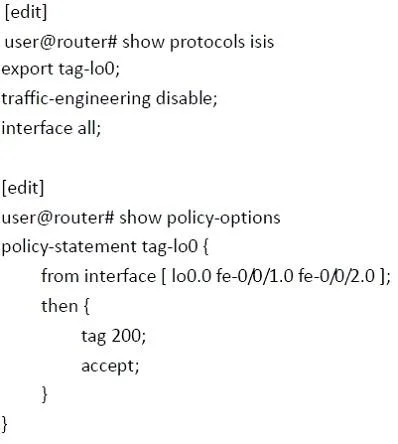
Refer to the exhibit. You have configured your Junos device to tag routes; however, you are not seeing the routes being tagged. What is causing the problem?
The correct answer is B. Route tagging does not work when IS-IS traffic engineering is disabled. See the full explanation below for the reasoning.
Question
Refer to the exhibit. You have configured your Junos device to tag routes; however, you are not seeing the routes being tagged. What is causing the problem?
Exhibit
Options
- AYou must configure the tagging on the physical interfaces, not on the loopback.
- BRoute tagging does not work when IS-IS traffic engineering is disabled.
- CYou must import the policy into IS-IS, not export it.
- DThe policy-statement should have only a then tag 200; the acceptis accepting the route and
How the community answered
(50 responses)- A2% (1)
- B84% (42)
- C6% (3)
- D8% (4)
Community Discussion
No community discussion yet for this question.