
Juniper
JN0-637 · Question #109
You are asked to ensure that Internet users can access the company's internal webserver using its FQDN. However, the internal DNS server's A record only points to the webserver's private address…
Sign in or unlock JN0-637 to reveal the answer and full explanation for question #109. The question stem and answer options stay visible for context.
Complex NAT Deployments
Question
You are asked to ensure that Internet users can access the company's internal webserver using its FQDN. However, the internal DNS server's A record only points to the webserver's private address. Referring to the exhibit, which two actions are required to complete this task? (Choose two.)
Exhibit
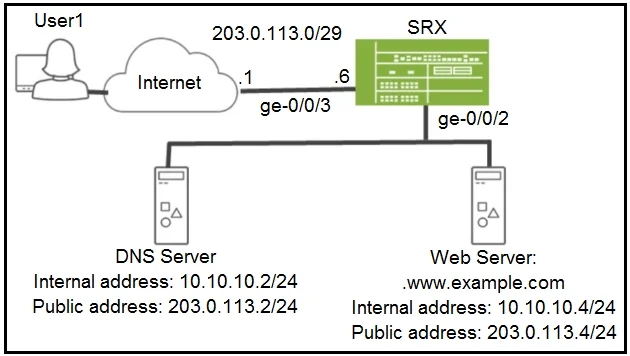
Options
- ADisable the DNS ALG.
- BConfigure static NAT for both the DNS server and the webserver.
- CConfigure destination NAT for both the DNS server and the webserver.
- DConfigure proxy ARP on ge-0/0/3.
Unlock JN0-637 to see the answer
You've previewed enough free JN0-637 questions. Unlock JN0-637 for full answers, explanations, the timed quiz mode, progress tracking, and the master PDF. Question stem and options stay visible so you can still see what's on the exam.
Topics
#static NAT#DNS#proxy ARP#NAT deployment