
Juniper
JN0-452 · Question #61
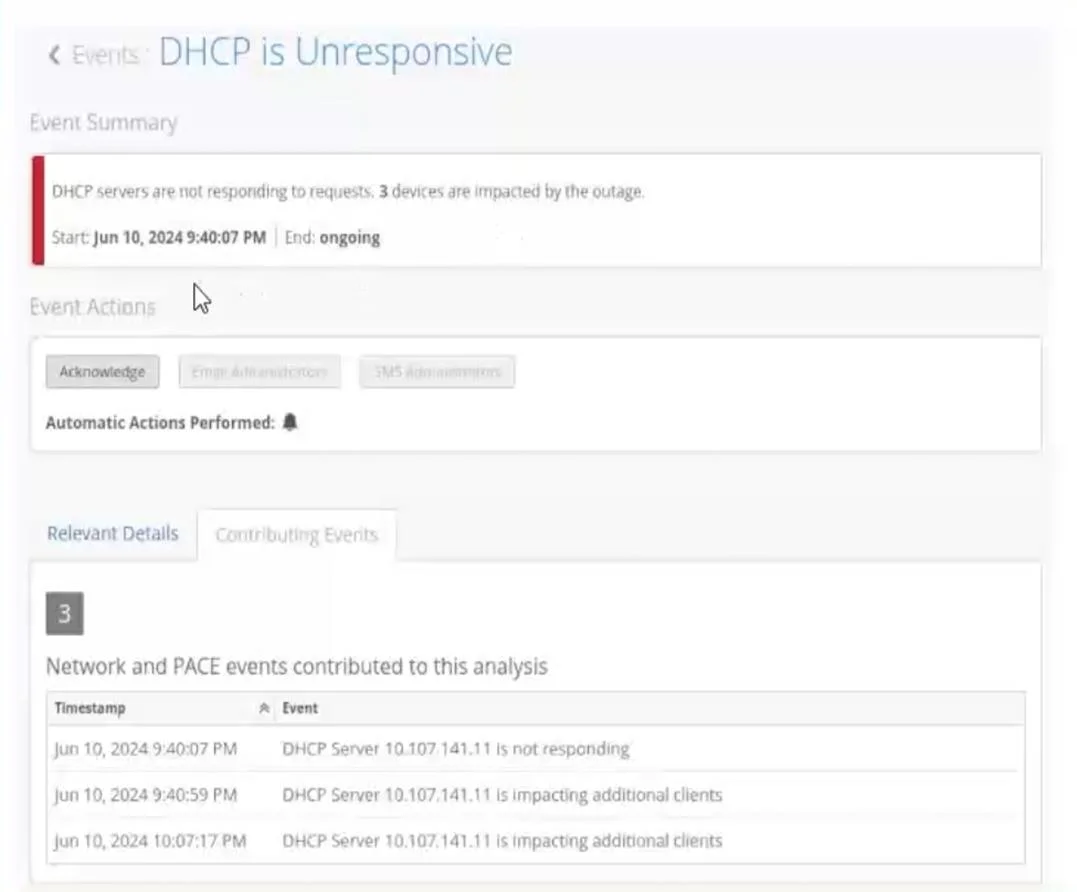
Click the Exhibit button. You notice that your site events show an unresponsive DHCP server in your network. You want to analyze the event by using the dynamic packet capture. Referring to the…
Sign in or unlock JN0-452 to reveal the answer and full explanation for question #61. The question stem and answer options stay visible for context.
Mist AI Wireless Troubleshooting
Question
Click the Exhibit button. You notice that your site events show an unresponsive DHCP server in your network. You want to analyze the event by using the dynamic packet capture. Referring to the exhibit, how would you access the packet capture for further analysis in Wireshark?
Exhibit
Options
- AVerify the impacted site and use the corresponding organization event to fetch the automatically
- BVerify the impacted site and use the corresponding site event to fetch the automatically generated
- CVerify the impacted client and use the corresponding site event to fetch the automatically
- DVerify the impacted client and use the corresponding client event to fetch the automatically
Unlock JN0-452 to see the answer
You've previewed enough free JN0-452 questions. Unlock JN0-452 for full answers, explanations, the timed quiz mode, progress tracking, and the master PDF. Question stem and options stay visible so you can still see what's on the exam.
Topics
#dynamic packet capture#DHCP troubleshooting#site events#Wireshark analysis