
JN0-363 · Question #19
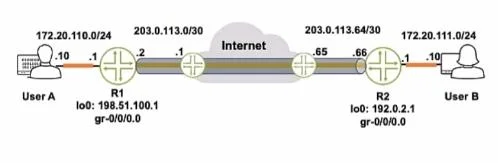
Referring to the exhibit, how do you verify the status of the tunnel from R1?
The correct answer is B. Issue the ping 172.20.111.10 source 198.51.100.1 command. To verify the status of the tunnel from R1, you would issue a ping from the source address that is assigned to R1's end of the tunnel. In the exhibit, we can see that the tunnel interface (gre- 0/0/0.0) has the IP address 198.51.100.1 on R1. Therefore, to test the tunnel's…
Question
Referring to the exhibit, how do you verify the status of the tunnel from R1?
Exhibit
Options
- AIssue the ping 172.20.111.10 source 172.20.110.1 command.
- BIssue the ping 172.20.111.10 source 198.51.100.1 command.
- CIssue the ping 172.20.iii.io source 203.0.113.2 command.
- DIssue the ping 172.20. Ill. 10 command.
How the community answered
(31 responses)- A3% (1)
- B77% (24)
- C13% (4)
- D6% (2)
Explanation
To verify the status of the tunnel from R1, you would issue a ping from the source address that is assigned to R1's end of the tunnel. In the exhibit, we can see that the tunnel interface (gre- 0/0/0.0) has the IP address 198.51.100.1 on R1. Therefore, to test the tunnel's status, you should ping the IP address at the other end of the tunnel (which is likely the address on User B's interface or another interface on R2) from R1's tunnel source address.
Topics
Community Discussion
No community discussion yet for this question.