
JN0-363 · Question #10
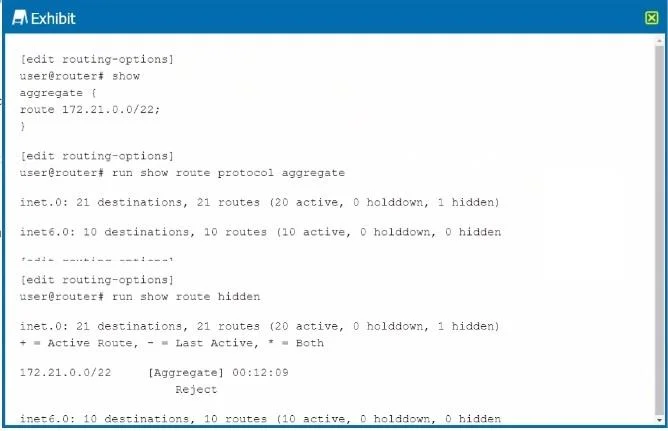
Referring to the exhibit, you have configured an aggregate route that represents the 172.21.0.0/24, 172.21.1.0/24, and 172.21.2.0/24 networks. However, when you view the routing table, your new…
The correct answer is D. Verify that you have set the preference to a lower default value. The exhibit shows an aggregate route configuration for the network 172.21.0.0/22, which would summarize the specific networks 172.21.0.0/24, 172.21.1.0/24, and 172.21.2.0/24. For an aggregate route to be active, it must have contributing routes in the routing table. If the…
Question
Referring to the exhibit, you have configured an aggregate route that represents the 172.21.0.0/24, 172.21.1.0/24, and 172.21.2.0/24 networks. However, when you view the routing table, your new route hidden. Which action would you perform to determine the problem?
Exhibit
Options
- AVerify that you have active contributing routes on the device.
- BVerify that you have configured a policy on the device to accept aggregate routes.
- CVerify that you have defined a metric value for the aggregate route.
- DVerify that you have set the preference to a lower default value.
How the community answered
(41 responses)- A17% (7)
- B2% (1)
- C7% (3)
- D73% (30)
Explanation
The exhibit shows an aggregate route configuration for the network 172.21.0.0/22, which would summarize the specific networks 172.21.0.0/24, 172.21.1.0/24, and 172.21.2.0/24. For an aggregate route to be active, it must have contributing routes in the routing table. If the route is hidden, it usually means there are no contributing routes that are active or the policy applied to the aggregate does not match any of the specific routes. Therefore, the first step in troubleshooting would be to verify that there are indeed active contributing routes for the aggregate to be valid.
Topics
Community Discussion
No community discussion yet for this question.