
HPE7-A08 · Question #44
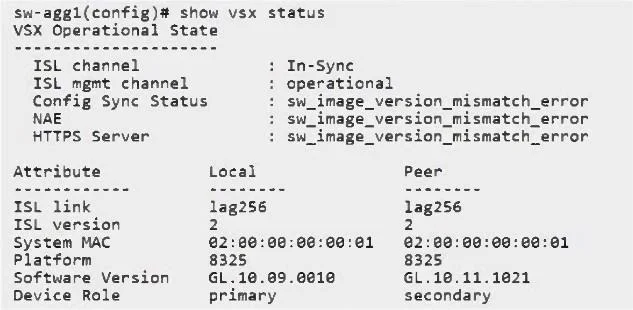
You've rebooted s-agg2 in a VSX configuration in an attempt to live-upgrade the cluster, and then you see this condition: What would be the correct way to live-upgrade the VSX cluster?
The correct answer is C. Use vsx update-software option. Live upgrades on Aruba CX VSX clusters must be performed using the vsx update-software This method verifies software compatibility, upgrades the secondary first, maintains forwarding during the process, and then upgrades the primary in a controlled sequence. Rebooting the…
Question
You've rebooted s-agg2 in a VSX configuration in an attempt to live-upgrade the cluster, and then you see this condition:
What would be the correct way to live-upgrade the VSX cluster?
Exhibit
Options
- AAlways reload the primary switch first with the new image.
- BUse the issu update-software option.
- CUse vsx update-software option.
- DSet the VSX to compatibility mode first, before rebooting the secondary switch.
How the community answered
(13 responses)- A8% (1)
- B15% (2)
- C69% (9)
- D8% (1)
Explanation
Live upgrades on Aruba CX VSX clusters must be performed using the vsx update-software This method verifies software compatibility, upgrades the secondary first, maintains forwarding during the process, and then upgrades the primary in a controlled sequence. Rebooting the secondary manually causes a software version mismatch error, as shown in the output. Only the VSX-aware update mechanism ensures a seamless, supported live-upgrade
Topics
Community Discussion
No community discussion yet for this question.