
HPE7-A08 · Question #31
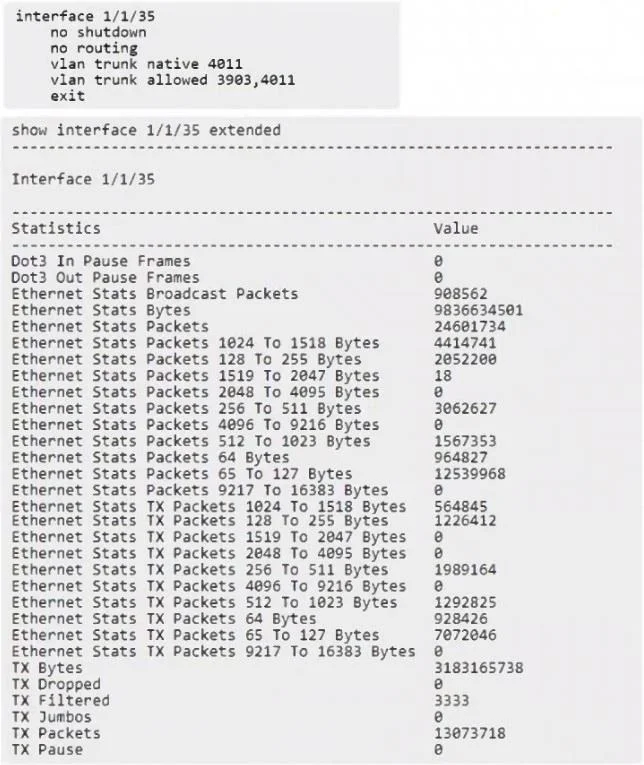
Refer to the exhibit. The interface is configured on an HPE Aruba Networking CX 8320 for a VMware server NIC, and the server admin reports that the VMware vMotion traffic on VLAN 3903 fails, but the…
The correct answer is D. Configure MTU 9198 on VLAN 3903. The interface statistics show zero jumbo frames, meaning the switch port is not forwarding frames larger than 1500 bytes. VMware vMotion requires MTU 9000+ across the entire path. On Aruba CX switches: Setting MTU or jumbo must be applied at the VLAN (SVI) level, not simply at…
Question
Refer to the exhibit. The interface is configured on an HPE Aruba Networking CX 8320 for a VMware server NIC, and the server admin reports that the VMware vMotion traffic on VLAN 3903 fails, but the server can ping other peers with default settings. What must be done to correct the issue based on the provided interface status and configuration?
Exhibit
Options
- AConfigure jumbo on VLAN 3903
- BConfigure jumbo on interface 1/1/35
- CConfigure MTU 9198 on interface 1/1/35
- DConfigure MTU 9198 on VLAN 3903
How the community answered
(32 responses)- A9% (3)
- B3% (1)
- C6% (2)
- D81% (26)
Explanation
The interface statistics show zero jumbo frames, meaning the switch port is not forwarding frames larger than 1500 bytes. VMware vMotion requires MTU 9000+ across the entire path. On Aruba CX switches: Setting MTU or jumbo must be applied at the VLAN (SVI) level, not simply at the physical The physical interface already forwards standard frames, which is why normal pings work. vMotion fails because VLAN 3903 does not support large frames (no jumbo/MTU configured).
Topics
Community Discussion
No community discussion yet for this question.