
HPE7-A08 · Question #210
For the aggregation layer, you must configure two new HPE Aruba Networking CX 6200M (VSF) switches. LACP link aggregations to downstream access switches using redundant ports from both switches are…
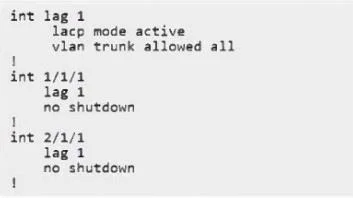
The correct answer is A. int lag 1 lacp mode active vlan trunk allowed all ! int 1/1/1 lag 1 no shutdown ! int 2/1/1 lag 1 no shutdown ! In a VSF stack, member ports from multiple switches are aggregated using a standard LAG, not a multi-chassis LAG (that is for VSX). The correct configuration therefore uses a single lag 1 with LACP active and adds both 1/1/1 and 2/1/1 as members.
Question
For the aggregation layer, you must configure two new HPE Aruba Networking CX 6200M (VSF) switches. LACP link aggregations to downstream access switches using redundant ports from both switches are required. Which configuration example would create the required lag setup on both switches utilizing HPE Aruba Networking clustering or stacking technologies? A. B. C. D.
Exhibits
Options
- Aint lag 1 lacp mode active vlan trunk allowed all ! int 1/1/1 lag 1 no shutdown ! int 2/1/1 lag 1 no shutdown !
- Bint lag 1 multi-chassis no shutdown lacp mode active vlan trunk allowed all ! int 1/1/1 lag 1 ! int 2/1/1 lag 1 !
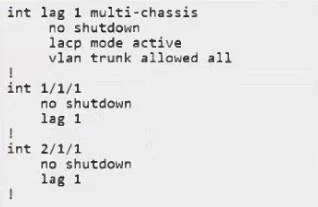
- Cint lag 1 multi-chassis no shutdown lacp mode active vlan trunk allowed all ! int 1/1/1 lag 1 ! int 2/1/1 no shutdown lag 1 !
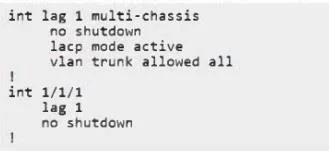
- Dint lag 1 no shutdown lacp mode active vlan trunk allowed all ! int 1/1/1 lag 1 no shutdown !
How the community answered
(25 responses)- A72% (18)
- B8% (2)
- C4% (1)
- D16% (4)
Explanation
In a VSF stack, member ports from multiple switches are aggregated using a standard LAG, not a multi-chassis LAG (that is for VSX). The correct configuration therefore uses a single lag 1 with LACP active and adds both 1/1/1 and 2/1/1 as members.
Topics
Community Discussion
No community discussion yet for this question.