
HPE7-A08 · Question #18
Drag and Drop Question Company A has an existing HPE Aruba Networking CX 8325 VSX. It has acquired Company B and must merge its networks onto the same VSX switch configuration as Company A. Both…
The correct answer is vrf company.b; interface vlan 200; vrf attach company.b; ip address 10.100.100.1/24. VRF Configuration for Overlapping Subnets - HPE Aruba AOS-CX Core Concept: When two networks share the same IP subnet, you use VRF (Virtual Routing and Forwarding) to create isolated routing tables. Each VRF is a separate logical router, so 10.100.100.1/24 can exist in two VRFs…
Question
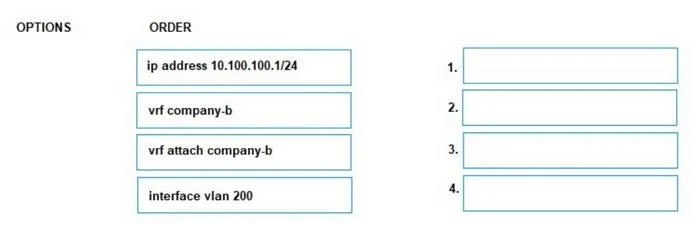
Drag and Drop Question Company A has an existing HPE Aruba Networking CX 8325 VSX. It has acquired Company B and must merge its networks onto the same VSX switch configuration as Company A. Both Company A and Company B share the same 10.100.100.1/24 subnet. What is the correct order for creating a configuration allowing overlapping networks in the setup? Answer:
Exhibit
Answer Area
Drag items
Correct arrangement
- vrf company.b
- interface vlan 200
- vrf attach company.b
- ip address 10.100.100.1/24
Explanation
VRF Configuration for Overlapping Subnets - HPE Aruba AOS-CX
Core Concept: When two networks share the same IP subnet, you use VRF (Virtual Routing and Forwarding) to create isolated routing tables. Each VRF is a separate logical router, so 10.100.100.1/24 can exist in two VRFs simultaneously without conflict.
Why This Order?
1. vrf company.b - Global VRF Creation
Position: First, because you cannot reference something that doesn't exist.
This is a global config command that instantiates the VRF. The switch has no knowledge of company.b until this line runs. Every subsequent step depends on this VRF existing. Attempting to attach a non-existent VRF in step 3 would throw an error.
2. interface vlan 200 - Enter Interface Context
Position: Second, because IP and VRF assignments are interface-level commands.
You must enter the interface configuration context before you can modify that interface. VLAN 200 is the Layer 3 SVI (Switch Virtual Interface) that will carry Company B's traffic. Nothing can be assigned to it until you're inside its config context.
3. vrf attach company.b - Bind the VRF to the Interface
Position: Third, before the IP address - this is the most critical ordering rule.
On AOS-CX, attaching a VRF to an interface wipes all existing IP configuration on that interface. This is by design - the IP must belong to a specific VRF's routing table. If you assigned the IP address first and then ran vrf attach, the IP would be automatically removed, and you'd have to re-enter it anyway.
4. ip address 10.100.100.1/24 - Assign the IP
Position: Last, after the VRF context is established.
Now the IP is assigned within the company.b VRF routing table - completely isolated from Company A's default VRF, which may also have 10.100.100.1/24. The overlap is resolved because each VRF maintains its own independent routing table.
Common Mistakes
| Mistake | Why It Fails |
|---|---|
Assigning ip address before vrf attach | AOS-CX removes the IP when VRF is attached - you lose the config |
Skipping vrf company.b globally | vrf attach fails - the VRF doesn't exist yet |
Doing vrf attach outside interface context | It's an interface-level command; it won't work in global config |
| Using the same VLAN for both companies | Both VRFs need distinct interfaces/VLANs to separate traffic at L2 |
Key takeaway: The dependency chain is strict - create VRF → enter interface → attach VRF → assign IP. Each step is a prerequisite for the next.
Topics
Community Discussion
No community discussion yet for this question.