
HPE7-A08 · Question #157
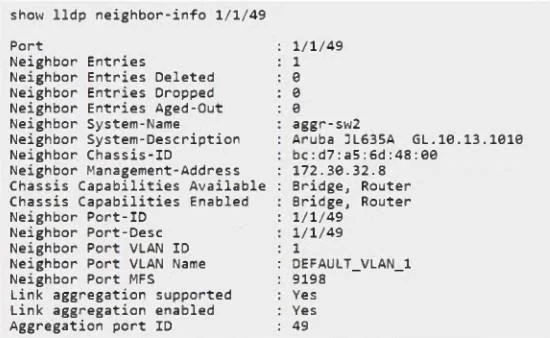
Refer to the exhibit: The neighbor switch is configured with the following IP interfaces: - mgmt.: 172.30.32.8 - loopback 0: 10.255.255.2 - vlan 5: 192.168.5.2 How can you change the advertised…
The correct answer is B. Issue in global context command: lldp management-address vlan 5. On Aruba CX switches, the LLDP-advertised management address is controlled globally, not under the VLAN interface. To change the LLDP management IP to use the IP assigned to VLAN 5, you specify the VLAN interface globally as the source of the LLDP management address.
Question
Refer to the exhibit:
The neighbor switch is configured with the following IP interfaces:
- mgmt.: 172.30.32.8
- loopback 0: 10.255.255.2
- vlan 5: 192.168.5.2
How can you change the advertised management IP information to appear as the VLAN 5 IP?
Exhibit
Options
- AUnder interface vlan 5, issue command: lldp management-address
- BIssue in global context command: lldp management-address vlan 5
- CUnder lldp context: lldp management-address 192.168.5.2
- DIssue in global context command: lldp management-ipv4-address vlan 5
How the community answered
(33 responses)- A6% (2)
- B82% (27)
- C9% (3)
- D3% (1)
Explanation
On Aruba CX switches, the LLDP-advertised management address is controlled globally, not under the VLAN interface. To change the LLDP management IP to use the IP assigned to VLAN 5, you specify the VLAN interface globally as the source of the LLDP management address.
Topics
Community Discussion
No community discussion yet for this question.