
HPE7-A08 · Question #15
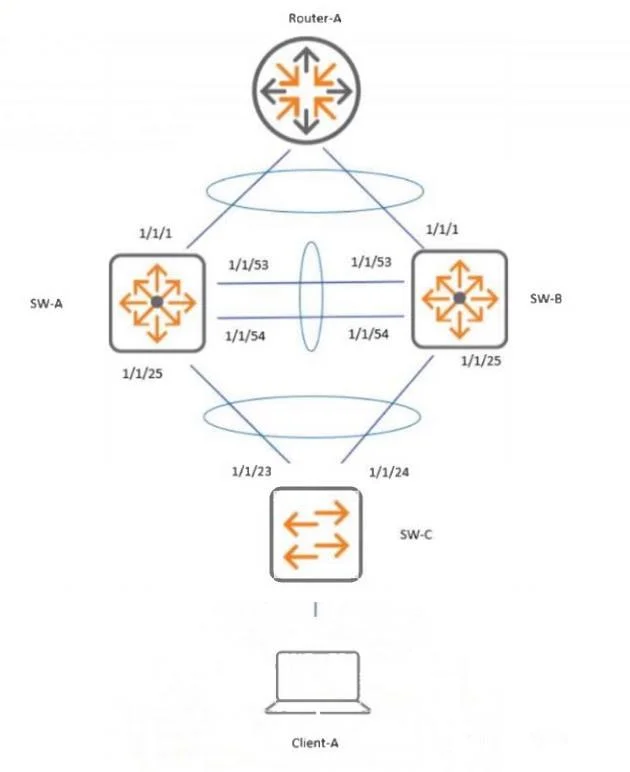
Refer to the exhibit. Interfaces 1/1/53 and 1/1/54 were accidentally disconnected from Switch-A, the primary VSX member. Client A is experiencing network disruptions with network connections to…
The correct answer is A. Configure keepalive using mgmt ports between SW-A and SW-B. The accidental disconnection removed the ISL links between the VSX peers. Without a functioning VSX keepalive, the secondary switch cannot determine whether the primary is still active, which may lead to both switches forwarding as active devices and causing traffic Using the…
Question
Refer to the exhibit. Interfaces 1/1/53 and 1/1/54 were accidentally disconnected from Switch-A, the primary VSX member. Client A is experiencing network disruptions with network connections to Router-A. What needs to be done to prevent user traffic disruption in this scenario?
Exhibit
Options
- AConfigure keepalive using mgmt ports between SW-A and SW-B.
- BConfigure VSX shutdown on-split on SW-B.
- CConfigure keepalive VLAN on upstream lag.
- DConfigure VSX shutdown on-split on SW-A.
How the community answered
(37 responses)- A68% (25)
- B5% (2)
- C19% (7)
- D8% (3)
Explanation
The accidental disconnection removed the ISL links between the VSX peers. Without a functioning VSX keepalive, the secondary switch cannot determine whether the primary is still active, which may lead to both switches forwarding as active devices and causing traffic Using the management ports as the VSX keepalive channel ensures split-brain detection and prevents user traffic interruption when the ISL goes down.
Topics
Community Discussion
No community discussion yet for this question.