
HPE7-A08 · Question #134
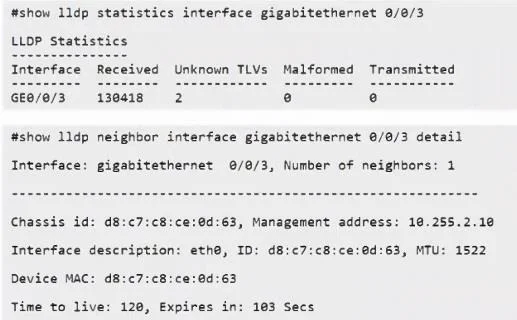
A customer with a gateway connected to a device on gigabitethernet 0/0/3 configures an Asset ID TLV on the device for inventory management. Refer to the exhibit. The customer mentions the Asset ID…
The correct answer is C. LLDP-MED needs to be enabled. Asset ID TLV belongs to the LLDP-MED extension, not base LLDP. Without enabling LLDP-MED on the interface, the device will never advertise or receive inventory management TLVs like Asset ID - even if standard LLDP is fully operational. LLDP-MED (defined in ANSI/TIA-1057) adds a…
Question
A customer with a gateway connected to a device on gigabitethernet 0/0/3 configures an Asset ID TLV on the device for inventory management. Refer to the exhibit. The customer mentions the Asset ID is not shown. What is causing the issue?
Exhibit
Options
- AMTU size is too small.
- BUnknown TLVs cannot be displayed.
- CLLDP-MED needs to be enabled.
- DLLDP TX is not enabled.
How the community answered
(42 responses)- A5% (2)
- B12% (5)
- C81% (34)
- D2% (1)
Explanation
Asset ID TLV belongs to the LLDP-MED extension, not base LLDP. Without enabling LLDP-MED on the interface, the device will never advertise or receive inventory management TLVs like Asset ID - even if standard LLDP is fully operational. LLDP-MED (defined in ANSI/TIA-1057) adds a separate TLV set specifically for capabilities like inventory, network policy, and location - none of which exist in base IEEE 802.1AB LLDP.
Why the distractors are wrong:
- A (MTU too small): LLDP frames are tiny control-plane messages; MTU limitations don't suppress individual TLVs from the output display.
- B (Unknown TLVs): Asset ID is a known, standardized TLV - it's not unknown, it's simply from the LLDP-MED extension that isn't enabled.
- D (LLDP TX not enabled): If TX were disabled, all LLDP information would be missing, not just the Asset ID. The exhibit shows other LLDP data is present, so TX is working fine.
Memory tip: When you see inventory TLVs (Asset ID, Serial Number, Hardware/Software Revision), think "MED = More Extended Details." Anything beyond basic neighbor discovery needs LLDP-MED enabled separately with lldp med enable or equivalent on the interface.
Topics
Community Discussion
No community discussion yet for this question.