
HPE7-A08 · Question #105
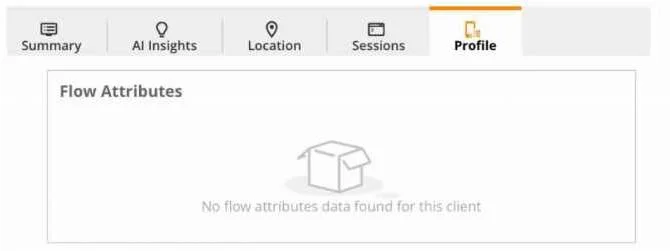
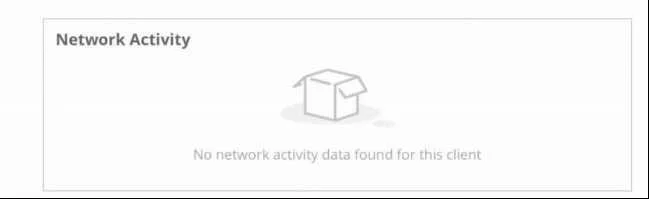
A customer is reviewing HPE Aruba Networking Central's Client Insights and notices that several wireless clients are not displaying flow attributes and network activity in the profile tab. This…
The correct answer is B. The wireless client VLANs on the gateways are marked as trusted D. The client's SSID is configured as mixed mode, and the clients experiencing the issue are bridged. Options B and D are correct because both describe scenarios where client traffic bypasses deep packet inspection (DPI) on the mobility gateway - the mechanism that feeds flow attribute and network activity data to Central's Client Insights. B is correct because when wireless…
Question
A customer is reviewing HPE Aruba Networking Central's Client Insights and notices that several wireless clients are not displaying flow attributes and network activity in the profile tab. This deployment is using AOS-10 mobility gateways. What are the possible reasons why this data is not visible in HPE Aruba Networking Central? (Select two)
Exhibits
Options
- AThe client's SSID is configured as mixed mode, and the clients experiencing the issue are
- BThe wireless client VLANs on the gateways are marked as trusted
- CThe client's SSID is configured as bridged
- DThe client's SSID is configured as mixed mode, and the clients experiencing the issue are bridged
- EThe wireless client VLANs on the gateways are marked as untrusted
How the community answered
(35 responses)- A9% (3)
- B54% (19)
- C14% (5)
- E23% (8)
Explanation
Options B and D are correct because both describe scenarios where client traffic bypasses deep packet inspection (DPI) on the mobility gateway - the mechanism that feeds flow attribute and network activity data to Central's Client Insights.
B is correct because when wireless client VLANs are marked as trusted on the gateway, traffic is not subjected to stateful firewall/DPI inspection. Since Client Insights relies on the gateway inspecting flows, trusted VLANs produce no flow telemetry.
D is correct because in mixed-mode SSIDs, individual clients can operate in either tunnel or bridge mode. Bridged clients send traffic directly to the local network, completely bypassing the gateway - so no DPI occurs and no flow data reaches Central. This also explains why only several clients are affected, not all of them.
Why the distractors are wrong:
- A: Incomplete/cut off, but the key qualifier "bridged" (as in D) is what matters - without it, mixed mode alone doesn't cause the issue.
- C: A fully bridged SSID would cause all clients to lack flow data, not just several; it doesn't fit the scenario described.
- E: Untrusted VLANs are inspected by the firewall - this is actually the correct configuration for DPI to work, so it would not cause missing data.
Memory tip - "Traffic must Touch the gateway": Flow data only exists when traffic passes through the gateway. Two things that prevent this: Trusted VLANs (inspection skipped) and Bridge mode (gateway bypassed entirely). If the gateway never sees the traffic, Central never sees the flows.
Topics
Community Discussion
No community discussion yet for this question.