
HPE7-A08 · Question #103
Drag and Drop Question You are tasked with developing a comprehensive, flexible, and survivable zero-trust wired access network using CX 6300 switching and HPE Aruba Networking ClearPass Policy…
The correct answer is Critical role; Auth-role; Fallback role; Rapid role; Pre-authentication role. HPE Aruba ClearPass Zero-Trust Roles - Explained This question tests your understanding of the five special port roles used in an 802.1X/MAC-auth zero-trust deployment on CX 6300 + ClearPass. Each role handles a distinct phase or failure condition of the authentication…
Question
Drag and Drop Question You are tasked with developing a comprehensive, flexible, and survivable zero-trust wired access network using CX 6300 switching and HPE Aruba Networking ClearPass Policy Manager. Match the scenario to the special roles to achieve your objectives. Answer:
Exhibit
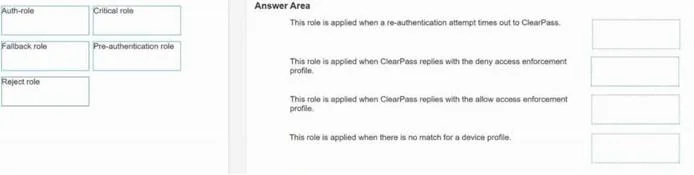
Answer Area
Drag items
Correct arrangement
- Critical role
- Auth-role
- Fallback role
- Rapid role
- Pre-authentication role
Explanation
HPE Aruba ClearPass Zero-Trust Roles - Explained
This question tests your understanding of the five special port roles used in an 802.1X/MAC-auth zero-trust deployment on CX 6300 + ClearPass. Each role handles a distinct phase or failure condition of the authentication lifecycle.
The Correct Arrangement & Why
1. Critical Role
Scenario: The RADIUS/ClearPass server is unreachable (network outage, server down).
- This role provides network survivability - the explicit goal stated in the question.
- When ClearPass cannot be contacted, the switch falls back to this pre-configured role rather than locking out all users.
- It's scoped with limited, controlled access (e.g., local resources only) to maintain some business continuity without abandoning zero-trust principles.
- Common mistake: Confusing this with the Fallback role. Critical = server unreachable. Fallback = server reachable but auth failed.
2. Auth-Role
Scenario: Device has successfully authenticated via 802.1X or MAC-auth.
- This is the post-authentication role pushed by ClearPass after a successful policy decision.
- It grants the appropriate access level (VLAN, ACL, downloadable user role) based on the user's/device's identity and posture.
- This is the "normal operating state" for a zero-trust client - least-privilege access that matches validated identity.
- Common mistake: Assuming this is a single static role. In practice it's dynamic - ClearPass sends the specific auth-role per device/user.
3. Fallback Role
Scenario: Authentication attempt was made but failed (bad credentials, certificate error, posture failure).
- Applied when ClearPass is reachable but rejects the device.
- Typically provides limited or guest-only access, or redirects to a remediation VLAN.
- Keeps the port from going completely dark while still enforcing zero-trust policy.
- Common mistake: Mixing this up with Critical role. If the server responded with a reject → Fallback. If the server never responded → Critical.
4. Rapid Role
Scenario: Device is undergoing rapid re-authentication or uses a cached/accelerated auth path.
- Associated with rapid commit (fast 802.1X exchanges) or MAC-auth bypass for known/trusted devices that re-attach quickly.
- Provides a transient, time-limited role during the brief window of re-authentication, avoiding unnecessary disruption to the session.
- Supports the "flexible" objective - allowing efficient re-auth without full lockout.
- Common mistake: Treating this the same as pre-authentication. Rapid role applies to returning/re-authenticating devices with an established context, not brand-new connections.
5. Pre-Authentication Role
Scenario: Device has just connected to the port - no authentication has occurred yet.
- This is the initial state for every device on a zero-trust port.
- Extremely restrictive - typically only permits DHCP, DNS, and RADIUS traffic needed to initiate authentication.
- Enforces zero-trust's "never trust, always verify" principle at the moment of connection.
- Common mistake: Assuming pre-auth means "no role." The device absolutely has a role - it's just the most locked-down one. Ports don't sit in an undefined state.
Quick Reference
| Position | Role | Trigger |
|---|---|---|
| 1 | Critical | RADIUS server unreachable |
| 2 | Auth-role | Authentication succeeded |
| 3 | Fallback | Authentication failed (server reachable) |
| 4 | Rapid | Re-authentication / rapid commit |
| 5 | Pre-auth | Device just connected, no auth yet |
Key Distinction to Remember
Critical = infrastructure failure | Fallback = identity/credential failure | Pre-auth = no attempt yet
These three are the most commonly confused on exams.
Topics
Community Discussion
No community discussion yet for this question.