
HPE7-A07 · Question #52
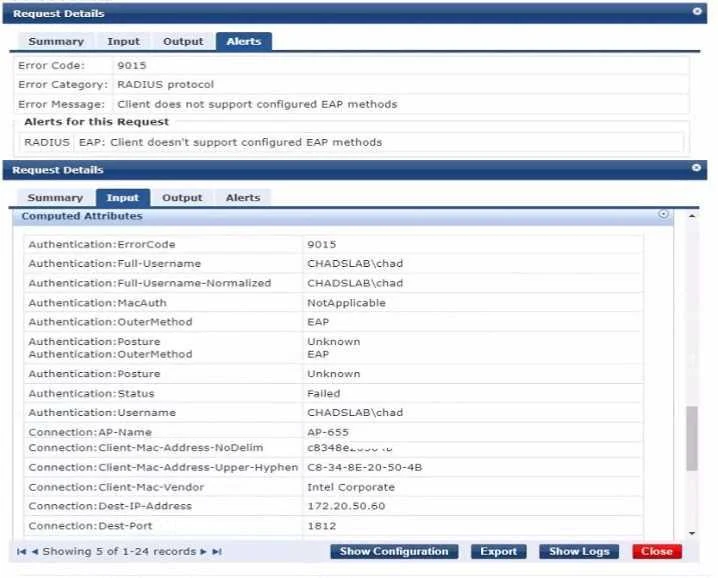
A Windows device attempts to connect to an 802.1X network but it is not receiving the correct role. TEAP has been configured as the only authentication method in ClearPass. The wireless…
The correct answer is A. The Windows device needs 10 De configured tor TEAP. The issue likely stems from the Windows device not being configured to use TEAP (Tunneled Extensible Authentication Protocol) as specified in the ClearPass configuration. TEAP is an EAP method that encapsulates an inner EAP method for secure authentication. The Windows device…
Question
A Windows device attempts to connect to an 802.1X network but it is not receiving the correct role. TEAP has been configured as the only authentication method in ClearPass. The wireless configuration is correct. Exhibit. What is me most likely cause?
Exhibit
Options
- AThe Windows device needs 10 De configured tor TEAP.
- BClearPass requires a second authentication method.
- C802.1X is not compatible with TEAP in windows device
- DOnly machine authentication should be configured on the Windows device
How the community answered
(47 responses)- A77% (36)
- B13% (6)
- C4% (2)
- D6% (3)
Explanation
The issue likely stems from the Windows device not being configured to use TEAP (Tunneled Extensible Authentication Protocol) as specified in the ClearPass configuration. TEAP is an EAP method that encapsulates an inner EAP method for secure authentication. The Windows device must have TEAP enabled and correctly configured in its network settings to authenticate successfully on the network using ClearPass.
Topics
Community Discussion
No community discussion yet for this question.