
HPE6-A85 · Question #26
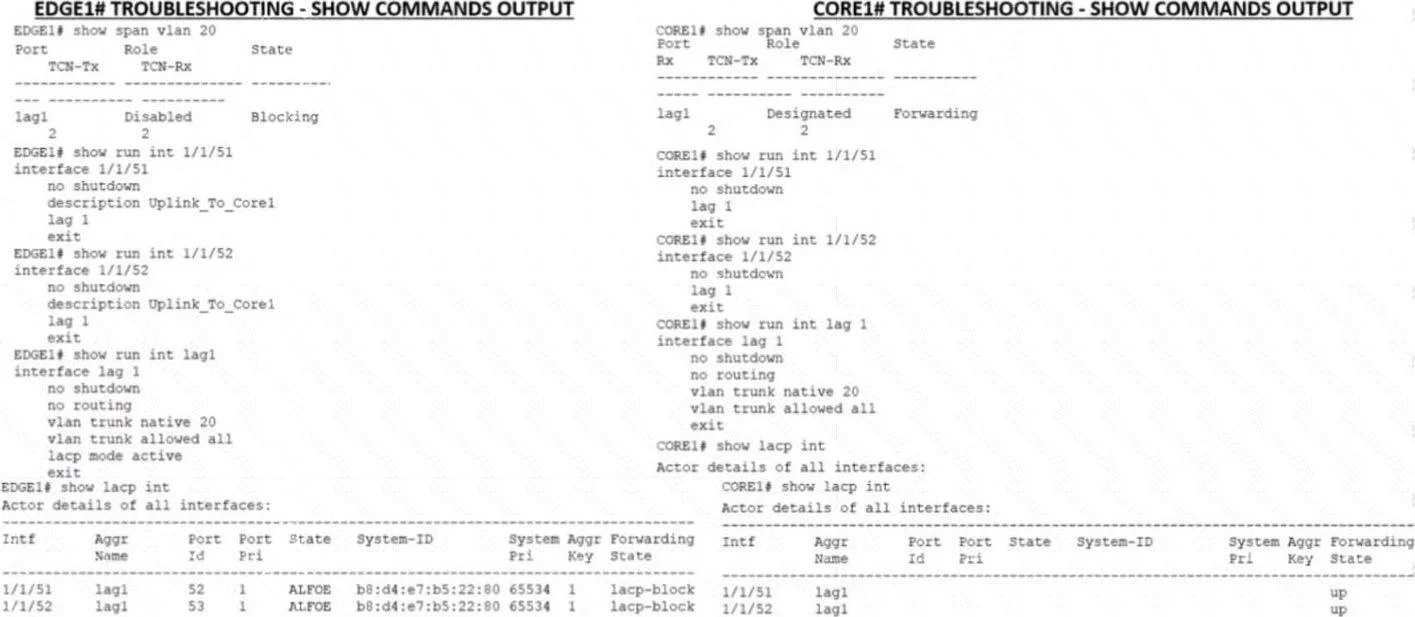
You put in a few show commands on switches EDGE1 and CORE1 to attempt to gather information to troubleshoot the issue. Use the show command output images to determine the reason for the EDGE1 uplink…
The correct answer is D. LACP is not configured on the Core uplink. LACP is a protocol that allows multiple physical links to be aggregated into a single logical link for increased bandwidth and redundancy. LACP must be configured on both ends of the link for it to work properly. In this case, EDGE1 has LACP configured on its uplink…
Question
You put in a few show commands on switches EDGE1 and CORE1 to attempt to gather information to troubleshoot the issue. Use the show command output images to determine the reason for the EDGE1 uplink being down:
Exhibit
Options
- AThe physical interfaces are not members of the correct LAG.
- BSpanning-Tree block state is preventing the Core uplink from having connectivity to the edge
- CThe Core is connected to the incorrect physical interlaces
- DLACP is not configured on the Core uplink
How the community answered
(50 responses)- A22% (11)
- B12% (6)
- C6% (3)
- D60% (30)
Explanation
LACP is a protocol that allows multiple physical links to be aggregated into a single logical link for increased bandwidth and redundancy. LACP must be configured on both ends of the link for it to work properly. In this case, EDGE1 has LACP configured on its uplink port-channel 1, but CORE1 does not have LACP configured on its corresponding port-channel 1. This causes a mismatch and prevents the link from coming up.
Topics
Community Discussion
No community discussion yet for this question.