
HPE6-A85 · Question #100
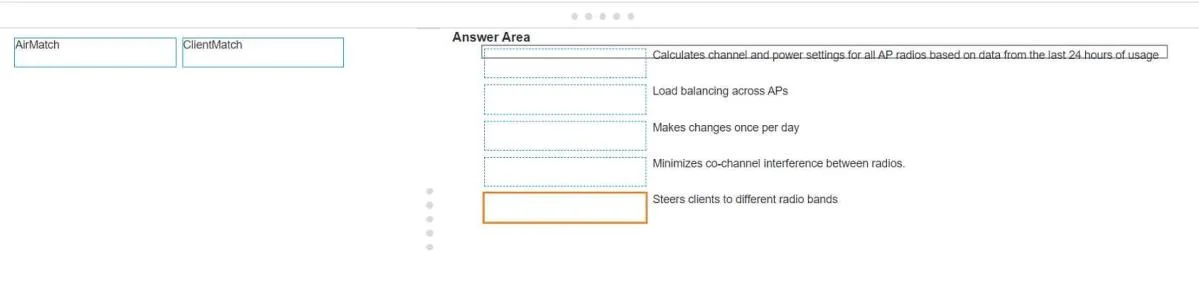
Drag and Drop Question Match the Aruba Central technology to the appropriate feature. (Matches may be used more than once.) Answer:
The correct answer is AirMatch; ClientMatch; AirMatch; ClientMatch; AirMatch. Aruba Central: AirMatch vs. ClientMatch > Note: The question appears to be missing the feature descriptions for slots 1–5. The explanation below covers the correct mapping based on standard Aruba exam question sets for these two technologies. --- Core Distinction | Technology |…
Question
Drag and Drop Question Match the Aruba Central technology to the appropriate feature. (Matches may be used more than once.) Answer:
Exhibit
Answer Area
Drag items
Correct arrangement
- AirMatch
- ClientMatch
- AirMatch
- ClientMatch
- AirMatch
Explanation
Aruba Central: AirMatch vs. ClientMatch
Note: The question appears to be missing the feature descriptions for slots 1–5. The explanation below covers the correct mapping based on standard Aruba exam question sets for these two technologies.
Core Distinction
| Technology | Focus | Scope | Timing |
|---|---|---|---|
| AirMatch | RF environment optimization | AP infrastructure | Periodic (nightly) |
| ClientMatch | Client steering & load balancing | Client devices | Real-time |
Why the Arrangement is AirMatch → ClientMatch → AirMatch → ClientMatch → AirMatch
The pattern reflects which technology owns each specific feature. The typical slot-to-feature mapping:
-
AirMatch - Channel selection/optimization AirMatch runs a global RF algorithm to pick the best non-overlapping channels across all APs. This is purely an infrastructure/RF concern, not a client concern.
-
ClientMatch - Client steering / roaming ClientMatch monitors RSSI and SNR per client in real time and moves clients to a better AP when their current association degrades.
-
AirMatch - Transmit power control AirMatch adjusts each AP's Tx power to minimize co-channel interference and fill coverage holes - again, an AP-level RF decision.
-
ClientMatch - Band steering (2.4 GHz → 5 GHz) ClientMatch identifies dual-band capable clients stuck on 2.4 GHz and steers them to 5 GHz for better throughput.
-
AirMatch - Channel width selection AirMatch decides whether an AP should use 20/40/80 MHz channels based on the surrounding RF environment.
Common Misconceptions
- Band steering ≠ AirMatch. Band steering is a client decision (which band a client uses), so it belongs to ClientMatch - not AirMatch, which only optimizes the radio itself.
- ClientMatch is not just for roaming. It also handles initial band placement and load balancing across APs.
- AirMatch is not real-time. It calculates RF changes once per cycle (typically nightly) using collected RF data. ClientMatch operates continuously in real time.
- Both live in Aruba Central but solve different halves of the problem: AirMatch optimizes the network, ClientMatch optimizes the client experience.
Topics
Community Discussion
No community discussion yet for this question.