
HPE6-A84 · Question #5
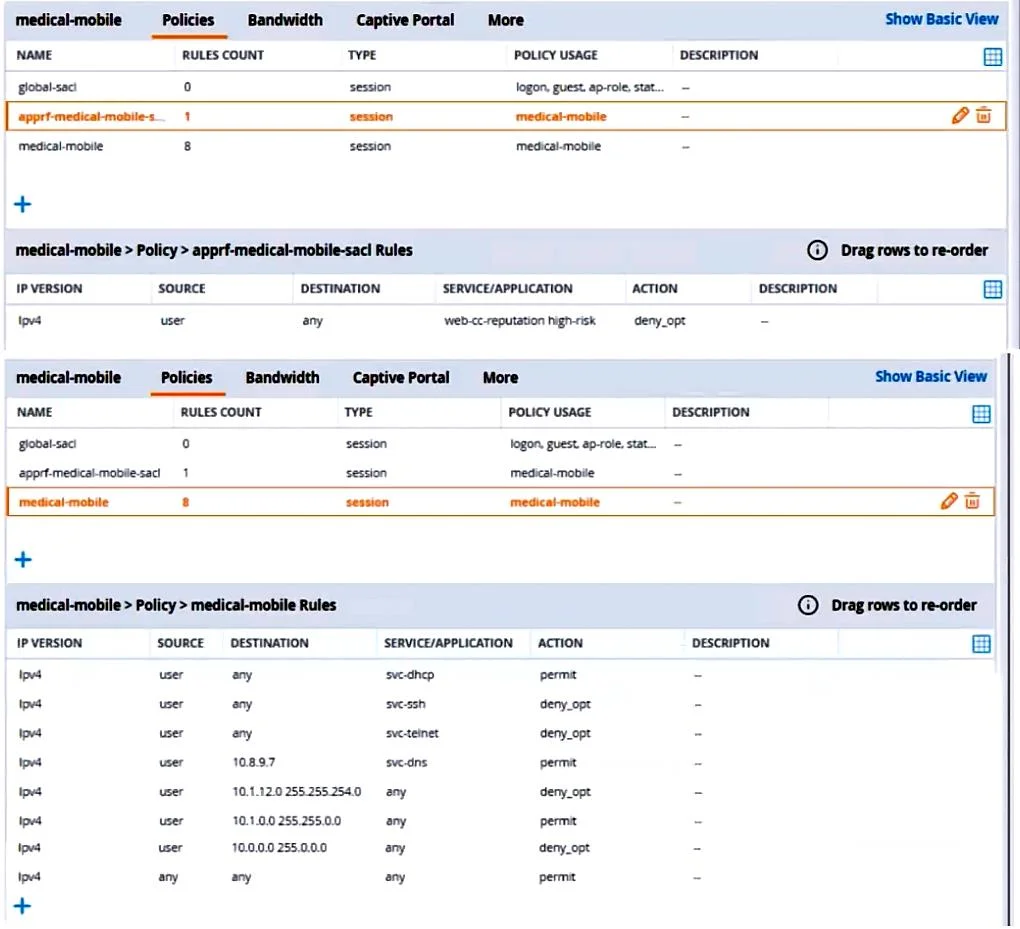
Refer to the scenario. A customer requires these rights for clients in the "medical-mobile" AOS firewall role on Aruba Mobility Controllers (MCs): - Permitted to receive IP addresses with DHCP…
The correct answer is C. That AppRF and WebCC are enabled globally and on the medical-mobile role. AppRF and WebCC are features that allow the MCs to classify and control application traffic and web content based on predefined or custom categories. These features are required to meet the scenario requirements of denying access to all high-risk websites and denying access to…
Question
Refer to the scenario. A customer requires these rights for clients in the “medical-mobile” AOS firewall role on Aruba Mobility Controllers (MCs):
- Permitted to receive IP addresses with DHCP
- Permitted access to DNS services from 10.8.9.7 and no other server
- Permitted access to all subnets in the 10.1.0.0/16 range except
denied access to 10.1.12.0/22
- Denied access to other 10.0.0.0/8 subnets
- Permitted access to the Internet
- Denied access to the WLAN for a period of time if they send any SSH
traffic
- Denied access to the WLAN for a period of time if they send any
Telnet traffic
- Denied access to all high-risk websites
External devices should not be permitted to initiate sessions with “medical-mobile” clients, only send return traffic. The exhibits below show the configuration for the role. What setting not shown in the exhibit must you check to ensure that the requirements of the scenario are met?
Exhibit
Options
- AThat denylisting is enabled globally on the MCs' firewalls
- BThat stateful handling of traffic is enabled globally on the MCs' firewalls and on the medical- mobile
- CThat AppRF and WebCC are enabled globally and on the medical-mobile role
- DThat the MCs are assigned RF Protect licenses
How the community answered
(26 responses)- A15% (4)
- B4% (1)
- C77% (20)
- D4% (1)
Explanation
AppRF and WebCC are features that allow the MCs to classify and control application traffic and web content based on predefined or custom categories. These features are required to meet the scenario requirements of denying access to all high-risk websites and denying access to the WLAN for a period of time if they send any SSH or Telnet traffic. To enable AppRF and WebCC, you need to check the following settings: On the global level, you need to enable AppRF and WebCC under Configuration > Services > AppRF and Configuration > Services > WebCC, respectively. On the role level, you need to enable AppRF and WebCC under Configuration > Security > Access Control > Roles > medical- mobile > AppRF and Configuration > Security > Access Control > Roles > medical-mobile > WebCC, respectively. You also need to make sure that the MCs have valid licenses for AppRF and WebCC, which are included in the ArubaOS PEFNG license.
Topics
Community Discussion
No community discussion yet for this question.