
HPE6-A84 · Question #41
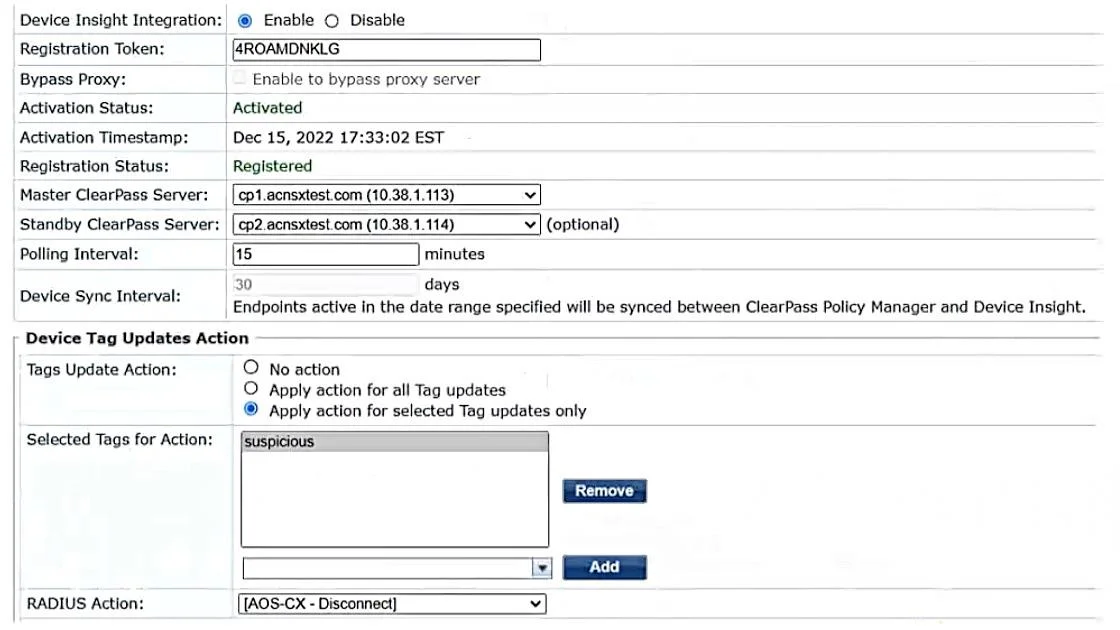
Refer to the exhibit. Aruba ClearPass Policy Manager (CPPM) is using the settings shown in the exhibit. You reference the tag shown in the exhibit in enforcement policies related to NASes of several…
The correct answer is C. Enable profiling in each service using one of these enforcement profiles. Set the profiling action to. According to the ClearPass Policy Manager User Guide1, the tag shown in the exhibit is a Device Insight tag, which is used to classify and identify devices based on their behavior and characteristics. Device Insight tags can be used as conditions in enforcement policies to…
Question
Refer to the exhibit. Aruba ClearPass Policy Manager (CPPM) is using the settings shown in the exhibit. You reference the tag shown in the exhibit in enforcement policies related to NASes of several types, including Aruba APs, Aruba gateways, and AOS-CX switches. What should you do to ensure that clients are reclassified and receive the correct treatment based on the tag?
Exhibit
Options
- AChange the RADIUS action to [Aruba Wireless -Terminate Session] which is supported by all the
- BChange the RADIUS action to [Aruba Wireless - Bounce Switch Port] which is supported by all the
- CEnable profiling in each service using one of these enforcement profiles. Set the profiling action to
- DSet the Tags Update Action to No Action. Then instead enable the RADIUS CoAs using
How the community answered
(28 responses)- A32% (9)
- B7% (2)
- C46% (13)
- D14% (4)
Explanation
According to the ClearPass Policy Manager User Guide1, the tag shown in the exhibit is a Device Insight tag, which is used to classify and identify devices based on their behavior and characteristics. Device Insight tags can be used as conditions in enforcement policies to apply different actions or roles to devices based on their tags. However, in order to ensure that devices are reclassified and receive the correct treatment based on their tags, profiling must be enabled in each service that uses one of these enforcement profiles. Profiling is a feature that allows ClearPass to dynamically discover and profile devices on the network, and update their attributes and tags accordingly. Profiling also allows ClearPass to send RADIUS Change of Authorization (CoA) messages to the network access servers (NASes) that control the access of the devices, and instruct them to reauthenticate or terminate the sessions of the devices that have changed their tags. The profiling action must be set to the correct one for the NASes using that service, as different NASes may support different types of CoA messages. Therefore, option C is the correct
Topics
Community Discussion
No community discussion yet for this question.