
HPE6-A84 · Question #12
Refer to the scenario. A hospital has an AOS10 architecture that is managed by Aruba Central. The customer has deployed a pair of Aruba 9000 Series gateways with Security licenses at each clinic…
The correct answer is C. View the RAPIDS Security Dashboard and see if the threat sources are listed as rogues. The RAPIDS Security Dashboard is a feature of Aruba Central that provides a comprehensive view of the network security status, including IDS/IPS events, rogue APs, and wireless intrusion detection. By viewing the RAPIDS Security Dashboard, you can see if the threat sources are…
Question
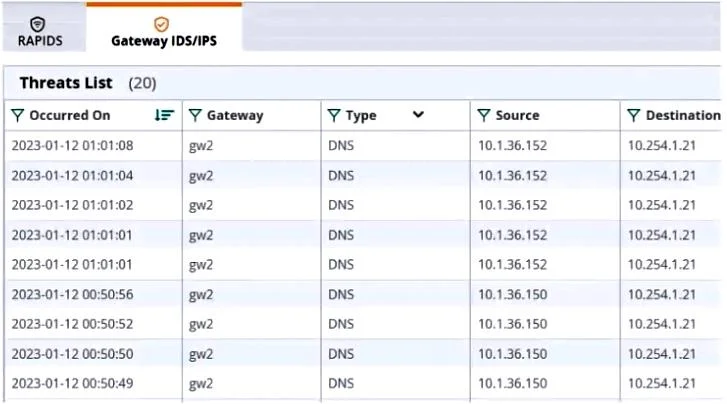
Refer to the scenario. A hospital has an AOS10 architecture that is managed by Aruba Central. The customer has deployed a pair of Aruba 9000 Series gateways with Security licenses at each clinic. The gateways implement IDS/IPS in IDS mode. The Security Dashboard shows these several recent events with the same signature, as shown below:
Which step could give you valuable context about the incident?
Exhibit
Options
- AView firewall sessions on the APs and record the threat sources' type and OS.
- BView the user-table on APs and record the threat sources' 802.11 settings.
- CView the RAPIDS Security Dashboard and see if the threat sources are listed as rogues.
- DFind the Central client profile for the threat sources and note their category and family.
How the community answered
(36 responses)- A3% (1)
- B8% (3)
- C83% (30)
- D6% (2)
Explanation
The RAPIDS Security Dashboard is a feature of Aruba Central that provides a comprehensive view of the network security status, including IDS/IPS events, rogue APs, and wireless intrusion detection. By viewing the RAPIDS Security Dashboard, you can see if the threat sources are rogue APs that are spoofing legitimate DNS servers or clients. This can give you valuable context about the incident and help you identify the root cause of the attack.
Topics
Community Discussion
No community discussion yet for this question.