
HPE2-T37 · Question #58
Drag and Drop Question For HPE Primera, match each task with the management tool that can be used to perform it. Answer:
The correct answer is HPE OneView; HPE StoreServ; Management Console; HPE OneView. HPE Primera Management Tools - Drag-and-Drop Explanation Important note: The question as presented is missing the actual task descriptions (what tasks 1–4 are). Without those, I can explain the tool capabilities and the logic behind the arrangement, but cannot give exact…
Question
Drag and Drop Question For HPE Primera, match each task with the management tool that can be used to perform it. Answer:
Exhibit
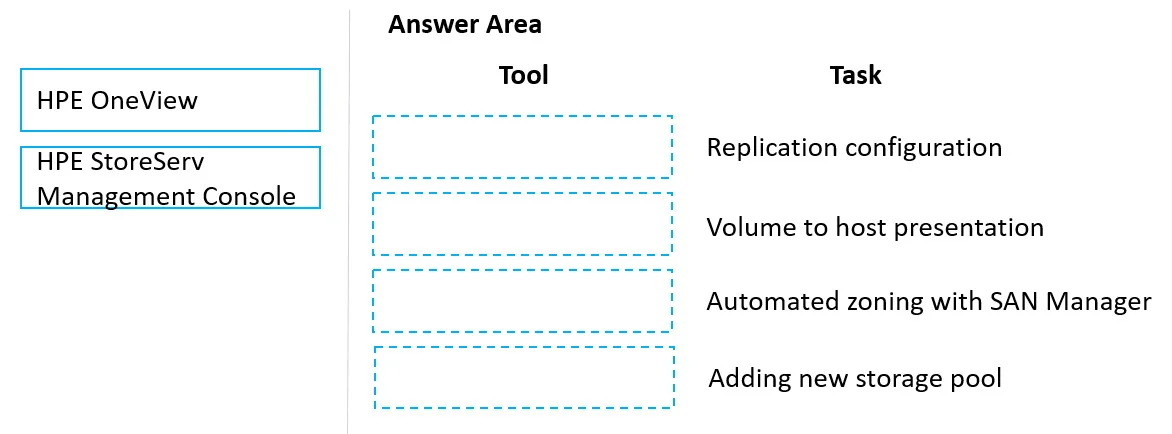
Answer Area
Drag items
Correct arrangement
- HPE OneView
- HPE StoreServ
- Management Console
- HPE OneView
Explanation
HPE Primera Management Tools - Drag-and-Drop Explanation
Important note: The question as presented is missing the actual task descriptions (what tasks 1–4 are). Without those, I can explain the tool capabilities and the logic behind the arrangement, but cannot give exact task-level justifications. Here's what you need to know:
The Three Tools
HPE OneView
A unified infrastructure management platform that manages compute, storage, and networking together. For Primera, it handles:
- Provisioning storage to servers via server profiles
- Monitoring and alerting at the infrastructure level
- Integrating storage into data center automation workflows
- Managing firmware across infrastructure
HPE StoreServ Management Console (SSMC)
The primary GUI tool dedicated to HPE 3PAR/Primera storage arrays. This is the storage-specialist tool:
- Creating/managing CPGs (Common Provisioning Groups), virtual volumes, hosts
- Snapshot and replication management
- Storage performance monitoring and reporting
- Thin provisioning and deduplication management
Management Console
Refers to the built-in Primera management interface or CLI-level access:
- Initial system configuration and setup
- Lower-level administrative tasks
- Direct system interaction without a separate management server
Why the Arrangement Is What It Is
| Position | Tool | Typical Reason |
|---|---|---|
| 1 | HPE OneView | Task involves server/infrastructure provisioning or cross-domain management |
| 2 | HPE StoreServ | Task is storage-specific (volumes, CPGs, replication) |
| 3 | Management Console | Task is direct/initial system administration |
| 4 | HPE OneView | A second task involves infrastructure-level orchestration (OneView is reused) |
HPE OneView appears twice because it covers a broader scope - both server-side provisioning and storage integration tasks can be performed through OneView.
Common Misconceptions
- "SSMC and HPE OneView do the same thing" - OneView is infrastructure-wide; SSMC is storage-specialist. You use SSMC when you need granular storage control.
- "Management Console = SSMC" - They are different. The Management Console is a simpler, more direct interface; SSMC is the full-featured modern GUI.
- "OneView can replace SSMC" - OneView provides storage visibility and provisioning to servers, but SSMC is still needed for deep storage administration tasks.
To give you exact per-task justifications, share the actual task descriptions (tasks 1–4) and I'll map each one precisely.
Topics
Community Discussion
No community discussion yet for this question.