
HPE0-V25 · Question #60
Drag and Drop Question Match the preconfigured HPE workload profile with its definition. Answer:
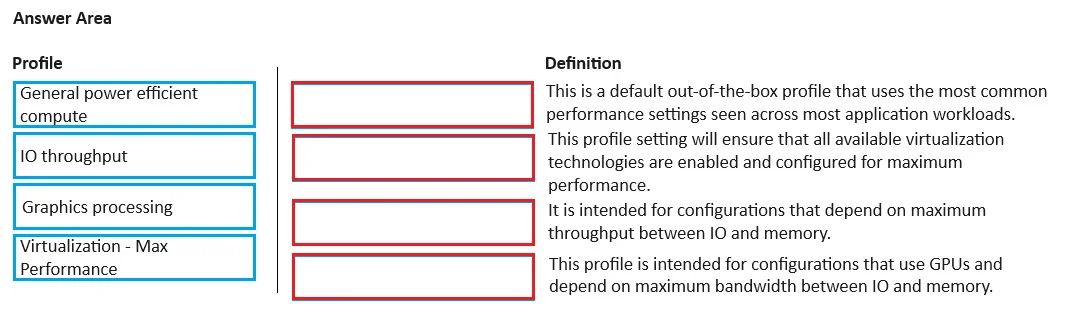
The correct answer is General power efficient compute: This is default out-of-the-box profile that uses the most common performance settings seen across most application workloads.; Virtualization - Max Performance: This profile setting will ensure that all available virtualization optimizations are enabled and configured for maximum performance.; IO throughput: It is intended for configurations that depend on maximum throughput between IO and memory.; Graphics processing: This profile is intended for configurations that use GPUs and depend on maximum bandwidth between IO and memory. HPE Workload Profiles - Matching Explanation This question tests knowledge of HPE's preconfigured server workload profiles (found in HPE iLO / BIOS settings). Each profile tunes BIOS/firmware settings for a specific use case. --- 1. General Power Efficient Compute → "Default…
Question
Drag and Drop Question Match the preconfigured HPE workload profile with its definition. Answer:
Exhibit
Answer Area
Drag items
Correct arrangement
- General power efficient compute: This is default out-of-the-box profile that uses the most common performance settings seen across most application workloads.
- Virtualization - Max Performance: This profile setting will ensure that all available virtualization optimizations are enabled and configured for maximum performance.
- IO throughput: It is intended for configurations that depend on maximum throughput between IO and memory.
- Graphics processing: This profile is intended for configurations that use GPUs and depend on maximum bandwidth between IO and memory.
Explanation
HPE Workload Profiles - Matching Explanation
This question tests knowledge of HPE's preconfigured server workload profiles (found in HPE iLO / BIOS settings). Each profile tunes BIOS/firmware settings for a specific use case.
1. General Power Efficient Compute → "Default out-of-the-box profile using the most common performance settings"
Why this match: Despite the name suggesting power-saving, HPE's "General Power Efficient Compute" is the baseline default profile - it balances performance and power without extreme tuning in either direction. It's the profile shipped on most servers.
Common misconception: Students often assume "power efficient" means low-performance or aggressive power-capping. In HPE's terminology, this is simply the general-purpose default, not a reduced-performance profile.
2. Virtualization - Max Performance → "All available virtualization optimizations enabled for maximum performance"
Why this match: This is straightforward - the profile name directly states its purpose. It enables CPU virtualization extensions (Intel VT-x/AMD-V), NUMA optimizations, large page support, and disables C-states/P-states that would throttle VM workloads.
Common misconception: Confusing this with the General profile. The key differentiator is "all available virtualization optimizations" - this profile goes beyond defaults specifically for hypervisors (VMware, Hyper-V, KVM).
3. IO Throughput → "Maximum throughput between IO and memory"
Why this match: This profile is tuned for storage and network-heavy workloads (databases, file servers, NVMe arrays). It optimizes PCIe bus settings, memory bandwidth, and interrupt handling to maximize data movement between storage/network adapters and RAM.
Common misconception: Confusing this with Graphics Processing. Both mention IO and memory, but IO Throughput focuses on throughput (raw data rate for storage/network), while Graphics focuses on bandwidth specifically for GPU workloads.
4. Graphics Processing → "Configurations using GPUs, maximum bandwidth between IO and memory"
Why this match: GPU workloads (ML training, rendering, CUDA) require extreme PCIe bandwidth between the GPU and system memory. This profile enables Above 4G Decoding, SR-IOV, PCIe slot optimizations, and memory settings specifically for GPU communication patterns.
Key differentiator from IO Throughput: The definition explicitly calls out GPUs and bandwidth (sustained, high-width data transfer) vs. IO Throughput's focus on throughput (volume of transactions). Bandwidth = width of the pipe; throughput = how much passes through over time - subtle but important distinction in HPE's framing.
Quick Reference Table
| Profile | Key Tuning Focus | Keyword to Remember |
|---|---|---|
| General Power Efficient Compute | Balanced defaults | "Default / out-of-the-box" |
| Virtualization - Max Performance | Hypervisor/VM extensions | "Virtualization optimizations" |
| IO Throughput | Storage & network data movement | "IO and memory throughput" |
| Graphics Processing | GPU PCIe bandwidth | "GPUs and bandwidth" |
The most common exam mistake is swapping IO Throughput and Graphics Processing - anchor on the word "GPU" appearing only in the Graphics definition.
Topics
Community Discussion
No community discussion yet for this question.