
HPE0-V25 · Question #59
Drag and Drop Question Match the RAID level with its capacity overhead. (Each option may be used once, more than once, or not at all.) Answer:
The correct answer is Capacity of one drive; Zero overhead from capacity prospective; Capacity of one drive; Capacity of two drives. RAID Capacity Overhead - Explanation The question is missing the left-column labels (the RAID levels), but the correct arrangement maps as follows based on standard RAID behavior: | Position | RAID Level | Overhead | |----------|-----------|----------| | 1 | RAID 1 | Capacity…
Question
Drag and Drop Question Match the RAID level with its capacity overhead. (Each option may be used once, more than once, or not at all.) Answer:
Exhibit
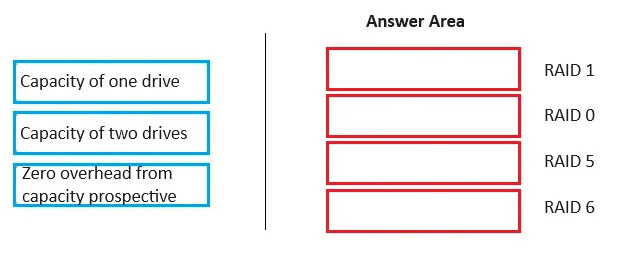
Answer Area
Drag items
Correct arrangement
- Capacity of one drive
- Zero overhead from capacity prospective
- Capacity of one drive
- Capacity of two drives
Explanation
RAID Capacity Overhead - Explanation
The question is missing the left-column labels (the RAID levels), but the correct arrangement maps as follows based on standard RAID behavior:
| Position | RAID Level | Overhead |
|---|---|---|
| 1 | RAID 1 | Capacity of one drive |
| 2 | RAID 0 | Zero overhead from capacity perspective |
| 3 | RAID 5 | Capacity of one drive |
| 4 | RAID 6 | Capacity of two drives |
Position-by-Position Breakdown
1. RAID 1 → Capacity of one drive RAID 1 mirrors data across exactly 2 drives. Every byte is written twice, so 50% of total storage is overhead - equivalent to one full drive. In a 2×1TB array, you get 1TB usable.
2. RAID 0 → Zero overhead RAID 0 stripes data across drives with no redundancy whatsoever. Every drive contributes 100% of its capacity to the usable pool. There is no parity, no mirroring - zero overhead. The tradeoff is that one failed drive loses all data.
3. RAID 5 → Capacity of one drive RAID 5 distributes parity across all drives. The total parity data equals exactly one drive's worth of capacity, regardless of how many drives are in the array. In a 4×1TB array, you get 3TB usable.
4. RAID 6 → Capacity of two drives RAID 6 uses dual distributed parity, allowing two simultaneous drive failures. This costs two full drives' worth of capacity. In a 4×1TB array, you get 2TB usable.
Common Misconceptions
- RAID 1 vs RAID 5 confusion: Both "cost" one drive's worth of capacity, but for different reasons - RAID 1 duplicates everything, RAID 5 stores calculated parity. Students often think RAID 5 is more wasteful because it sounds complex.
- RAID 0 seems wrong: It feels counterintuitive that "striping" has zero overhead, but RAID 0 provides no fault tolerance at all - it trades safety for pure capacity.
- RAID 6 overhead scales with array size? No - it's always exactly 2 drives, not a percentage. A 10-drive RAID 6 still only loses 2 drives to parity.
Topics
Community Discussion
No community discussion yet for this question.