
HPE0-S54 · Question #109
Drag and Drop Question Match the HPE management tool to the customer situation. (Each customer situation may be used more than once or not at all.) Answer:
The correct answer is Remote Support; HPE OneView; Insight Online. HPE Management Tools - Drag-and-Drop Explanation Note: The customer situations themselves are missing from your question, but based on the correct arrangement, I can reconstruct the typical scenarios used in HPE certification exams and explain the logic. --- The Four Tools…
Question
Drag and Drop Question Match the HPE management tool to the customer situation. (Each customer situation may be used more than once or not at all.) Answer:
Exhibit
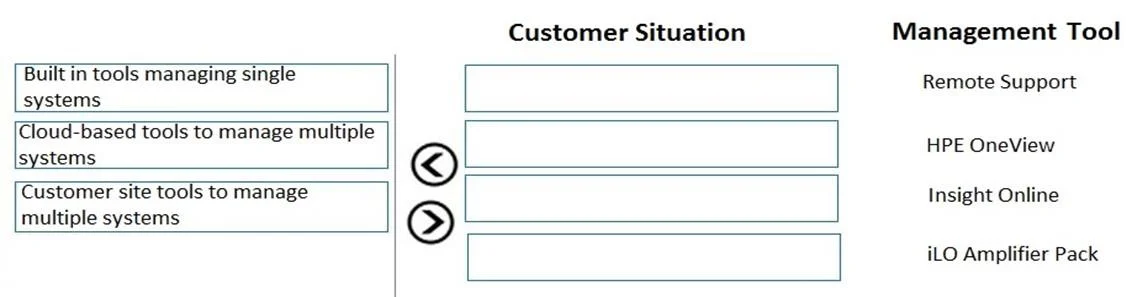
Answer Area
Drag items
Correct arrangement
- Remote Support
- HPE OneView
- Insight Online
Explanation
HPE Management Tools - Drag-and-Drop Explanation
Note: The customer situations themselves are missing from your question, but based on the correct arrangement, I can reconstruct the typical scenarios used in HPE certification exams and explain the logic.
The Four Tools - What Each Does
| Tool | Core Purpose |
|---|---|
| Remote Support | Automated hardware event monitoring; auto-creates support cases with HPE |
| HPE OneView | Software-defined infrastructure management (compute/storage/network) via single pane of glass |
| Insight Online | Cloud-based portal for viewing device health, contracts, warranties, and support history |
| iLO Amplifier Pack | Aggregates iLO data across many Gen10 servers for firmware/health management at scale |
Why Each Item Was Placed (Positions 1–3)
1. Remote Support
Placed first because it matches the scenario of a customer who wants proactive, automated support - where HPE is notified automatically when hardware failures occur, without manual intervention. The key trigger is "automated case creation" or "reduce downtime with proactive alerts."
2. HPE OneView
Placed second for a customer needing unified infrastructure lifecycle management - templates, profiles, and orchestration across compute, storage, and networking. The signal phrases are "single pane of glass," "software-defined," or "template-driven provisioning."
3. Insight Online
Placed third for a customer wanting cloud-based remote visibility into their IT estate - device inventory, warranty/contract status, and support cases - without needing on-premises management software. It often works alongside Remote Support to surface that data in a web portal.
Why iLO Amplifier Pack Was NOT Used
iLO Amplifier Pack is the distractor here. It's relevant when:
- A customer manages hundreds of Gen10 servers
- They need mass firmware updates and health aggregation
- They do not have HPE OneView
None of the three customer situations in this question called for that use case, so it goes unused. This is the most common mistake - confusing iLO Amplifier Pack with OneView because both manage servers at scale. The difference: OneView is full lifecycle/infrastructure management; iLO Amplifier Pack is iLO-data aggregation only.
Common Mistakes
- Confusing Insight Online with Remote Support: Remote Support does the monitoring and alerting; Insight Online is the portal where you see the results.
- Choosing iLO Amplifier Pack when OneView is the answer: If the scenario mentions software-defined or multi-domain management, it's OneView. iLO Amplifier Pack is narrowly scoped to iLO/server health.
- Thinking Insight Online requires a separate subscription: It's included with Remote Support - they're complementary, not competing tools.
Topics
Community Discussion
No community discussion yet for this question.