nerdexam
HP

HPE0-S52 · Question #58

Drag and Drop Question Match the correct redundancy level or use to the appropriate RAID level. Select and Place: Correct Answer: Section: (none) Explanation Explanation/Reference:

The correct answer is two sets of parity data are distributed across all drives; the ability to lose up to 50% of available drives; protects against the failure of any one drive in the array; a maximum of one drive from each of the RAID groups can fail without loss of data. RAID Level Matching - Explanation > Note: The question appears to be missing the target RAID level labels (the left-side drop zones). Based on the descriptions, here is what each item maps to and why: --- Item 1 → RAID 6 > "two sets of parity data are distributed across all drive

Install and configure HPE Server Solutions

Question

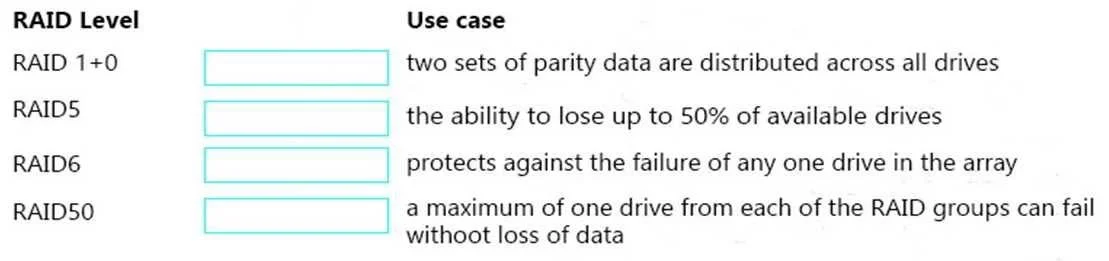
Drag and Drop Question Match the correct redundancy level or use to the appropriate RAID level. Select and Place:

Correct Answer:

Section: (none) Explanation Explanation/Reference:

Exhibit
HPE0-S52 question #58 exhibit

Answer Area

Drag items

two sets of parity data are distributed across all drivesthe ability to lose up to 50% of available drivesprotects against the failure of any one drive in the arraya maximum of one drive from each of the RAID groups can fail without loss of data

Correct arrangement

  • two sets of parity data are distributed across all drives
  • the ability to lose up to 50% of available drives
  • protects against the failure of any one drive in the array
  • a maximum of one drive from each of the RAID groups can fail without loss of data

Explanation

RAID Level Matching - Explanation

Note: The question appears to be missing the target RAID level labels (the left-side drop zones). Based on the descriptions, here is what each item maps to and why:


Item 1 → RAID 6

"two sets of parity data are distributed across all drives"

RAID 6 extends RAID 5 by writing two independent sets of parity (double parity) striped across all drives. This requires a minimum of 4 drives and can survive the simultaneous failure of any 2 drives. No other common RAID level distributes two parity sets.


Item 2 → RAID 1 (or RAID 10)

"the ability to lose up to 50% of available drives"

RAID 1 (mirroring) duplicates every drive, so exactly half the drives are redundant copies. You can lose one drive in every mirrored pair - up to 50% of total drives - and still have full data. This is also true of RAID 10, but the "up to 50%" phrasing is the classic descriptor for RAID 1.


Item 3 → RAID 5

"protects against the failure of any one drive in the array"

RAID 5 uses single distributed parity across a minimum of 3 drives. It tolerates exactly one drive failure - no more. This is its defining characteristic and the most commonly tested fact about RAID 5.


Item 4 → RAID 10

"a maximum of one drive from each of the RAID groups can fail without loss of data"

RAID 10 (1+0) combines mirrored pairs (RAID 1) that are then striped (RAID 0). Each RAID 1 group can lose one of its two drives safely. The phrase "each of the RAID groups" is the key signal - this describes a nested/hybrid array, not a flat RAID level.


Common Misconceptions

MistakeCorrection
Confusing RAID 5 and RAID 6 parityRAID 5 = one parity block; RAID 6 = two
Thinking RAID 10 = RAID 1 for the "50%" ruleRAID 10 can also lose 50%, but only if the right drives fail; RAID 1 guarantees 50% tolerance
Assuming RAID 6 is just "better RAID 5"RAID 6 has higher write overhead and requires more drives, a real trade-off
Confusing RAID 10 with RAID 01RAID 10 (mirror then stripe) is more resilient than RAID 01 (stripe then mirror)

Topics

#RAID levels#redundancy#RAID 5 6 10#storage configuration

Community Discussion

No community discussion yet for this question.

Full HPE0-S52 Practice