
HP0-S45 · Question #20
An integrator is installing an HP ProLiant BL460C Gen9 server into device bay 13 of an HP C700O BladeSystem enclosure. The integrator needs to access the UEFI System Utilities on the new server, but…
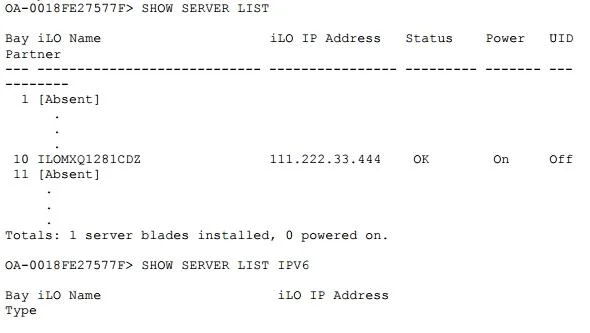
The correct answer is C. in Enclosure Bay IP Addressing in the Onboard Administrator. The command SHOW SERVER LIST is a blade management command. It displays a brief description of all server blades to which the current user has access It displays by default IPv4 information; to display IPv6 information, enter the IPV6 keyword
Question
An integrator is installing an HP ProLiant BL460C Gen9 server into device bay 13 of an HP C700O BladeSystem enclosure. The integrator needs to access the UEFI System Utilities on the new server, but is unable to do so because the iLOM Integrated Remote Console is not accessible. Where can the integrator confirm the IP address of the (L04 interface for this blade?
Exhibit
Options
- Ain Network Access in the Onboard Administrator
- Bin the 1LO4 Web interface using me BladeSystem c 7000 Insight Display
- Cin Enclosure Bay IP Addressing in the Onboard Administrator
- Din Enclosure TCP/IP Settings in the Onboard Administrator
How the community answered
(38 responses)- A5% (2)
- B3% (1)
- C82% (31)
- D11% (4)
Explanation
The command SHOW SERVER LIST is a blade management command. It displays a brief description of all server blades to which the current user has access It displays by default IPv4 information; to display IPv6 information, enter the IPV6 keyword
Topics
Community Discussion
No community discussion yet for this question.