
H12-311_V3.0 · Question #344
An engineer was unable to establish a connection with the AD server during the process of configuring Agile Controller. The engineer checked that the IP address of the AD directory server and the…
The correct answer is C. Terminal error D. Base DN error. Options C and D point to Agile Controller-side misconfigurations that can prevent an AD connection without requiring any changes to the AD server itself. C (Terminal error) refers to the LDAP port - if it's set incorrectly (e.g., 636 instead of 389 for standard LDAP, or vice…
Question
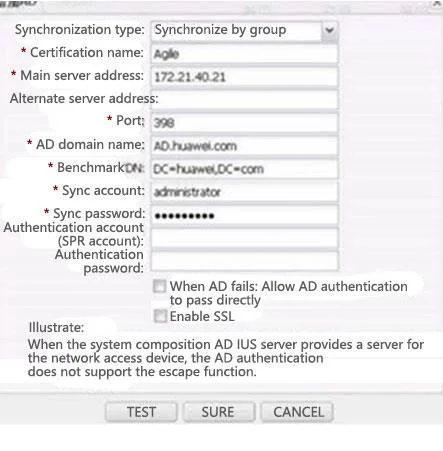
An engineer was unable to establish a connection with the AD server during the process of configuring Agile Controller. The engineer checked that the IP address of the AD directory server and the synchronization account and password were correct, and did not perform additional configuration on the AD directory server. The specific configuration is shown in the figure below. What is the cause of this problem? (Multiple choice)
Exhibit
Options
- ASynchronization type error
- BAuthentication source name error
- CTerminal error
- DBase DN error
- ESSL is not enabled
How the community answered
(50 responses)- A12% (6)
- B8% (4)
- C76% (38)
- E4% (2)
Explanation
Options C and D point to Agile Controller-side misconfigurations that can prevent an AD connection without requiring any changes to the AD server itself. C (Terminal error) refers to the LDAP port - if it's set incorrectly (e.g., 636 instead of 389 for standard LDAP, or vice versa), the connection attempt will fail even when the IP and credentials are valid. D (Base DN error) means the directory search starting point (e.g., DC=company,DC=com) doesn't match the actual AD structure - an incorrect Base DN causes LDAP queries to fail or return nothing.
Why the distractors are wrong: A (Synchronization type) is not the issue because the protocol type is assumed correct in the scenario. B (Authentication source name) is just a local display label in Agile Controller and has no effect on the actual connection. E (SSL not enabled) is ruled out because the question states no extra configuration was done on the AD server - enabling SSL would require server-side certificate setup, so it's not the cause here.
Memory tip: After confirming the "Big 3" (IP, username, password), remember the "Port and Path" rule - Terminal (port) and Base DN (LDAP path) are the next two things to verify. If either is wrong, LDAP can't reach or traverse the directory tree.
Topics
Community Discussion
No community discussion yet for this question.