
GPEN · Question #430
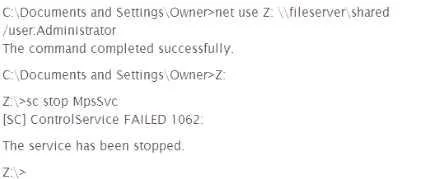
A penetration tester wishes to stop the Windows Firewall process on a remote host running Windows Vista She issues the following commands: A check of the remote host indicates that Windows Firewall…
The correct answer is C. The sc command needs to be passed the IP address of the target. The sc command requires the remote host's IP address or name with the \\ prefix to manage services on a remote Windows machine.
Question
A penetration tester wishes to stop the Windows Firewall process on a remote host running Windows Vista She issues the following commands:
A check of the remote host indicates that Windows Firewall is still running. Why did the command fail?
Exhibit
Options
- AThe kernel prevented the command from being executed.
- BThe user does not have the access level needed to stop the firewall.
- CThe sc command needs to be passed the IP address of the target.
- DThe remote server timed out and did not complete the command.
How the community answered
(19 responses)- A5% (1)
- B16% (3)
- C74% (14)
- D5% (1)
Why each option
The sc command requires the remote host's IP address or name with the \\ prefix to manage services on a remote Windows machine.
The Windows kernel does not block sc from executing; the command simply targeted the wrong machine due to missing remote host syntax.
There is no indication of a privilege issue; the command failed because it was not directed at the remote host, not because of insufficient permissions.
The sc command syntax for remote service management requires the target specified as sc \\<IP_or_hostname> stop <service_name>. Without the remote target prefix, sc operates on the local machine rather than the remote Vista host, so the firewall on the target is never contacted or stopped.
A timeout would produce a network error, not silent failure; the firewall continues running because the command never reached the remote host.
Concept tested: Remote Windows service control with sc command syntax
Source: https://learn.microsoft.com/en-us/windows-server/administration/windows-commands/sc-create
Topics
Community Discussion
No community discussion yet for this question.