
GPEN · Question #398
A junior penetration tester at your firm is using a non-transparent proxy for the first time to test a web server. He sees the web site In his browser but nothing shows up In the proxy. He tells you…
Sign in or unlock GPEN to reveal the answer and full explanation for question #398. The question stem and answer options stay visible for context.
Question
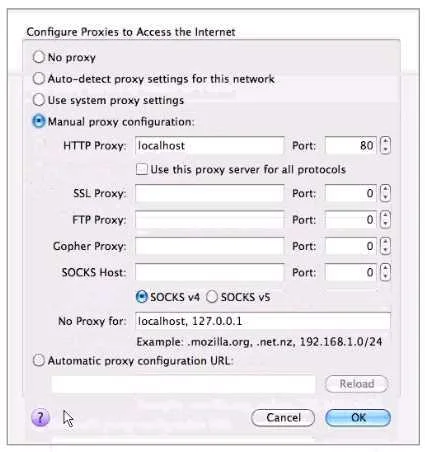
A junior penetration tester at your firm is using a non-transparent proxy for the first time to test a web server. He sees the web site In his browser but nothing shows up In the proxy. He tells you that he just installed the non-transparent proxy on his computer and didn't change any defaults. After verifying the proxy is running, you ask him to open up his browser configuration, as shown in the figure, which of the following recommendations will correctly allow him to use the transparent proxy with his browser?
Exhibit
Options
- AHe should change the PORT: value to match the port used by the non-transparentproxy.
- BHe should select the checkbox "use this proxy server for all protocols" for theproxy to function
- CHe should change the HTTP PROXY value to 127.0.0.1 since the non-transparentproxy is
- DHe should select NO PROXY instead of MANUAL PROXY CONFIGURATION as thissetting is
Unlock GPEN to see the answer
You've previewed enough free GPEN questions. Unlock GPEN for full answers, explanations, the timed quiz mode, progress tracking, and the master PDF. Question stem and options stay visible so you can still see what's on the exam.