
GCIH · Question #794
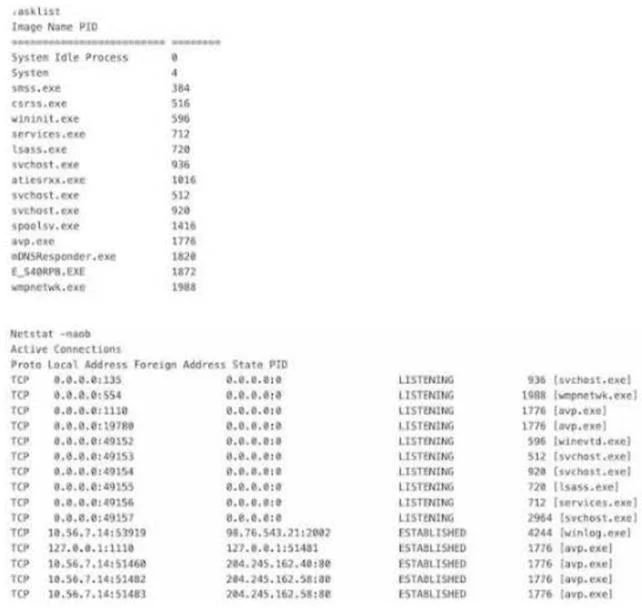
A Windows workstation was clean a few days ago but now appears to be infected. Based on results from tasklist, which was run last week, which connection or connections shown in netstat - naob, run…
The correct answer is C. The connections with lsass.exe. Identifying malicious network activity by cross-referencing known-clean process baselines from tasklist with active connections shown in netstat.
Question
A Windows workstation was clean a few days ago but now appears to be infected. Based on results from tasklist, which was run last week, which connection or connections shown in netstat - naob, run today, most likely indicates the host is now infected?
Exhibit
Options
- AThe connection with winevtd.exe
- BThe connection with wmpnetwk.exe
- CThe connections with lsass.exe
- DThe connections with svchost.exe
How the community answered
(24 responses)- A8% (2)
- B21% (5)
- C67% (16)
- D4% (1)
Why each option
Identifying malicious network activity by cross-referencing known-clean process baselines from tasklist with active connections shown in netstat.
winevtd.exe is not a recognized standard Windows system process, but if it appeared in last week's clean tasklist baseline it was already present before the suspected infection occurred.
wmpnetwk.exe is the legitimate Windows Media Player Network Sharing Service and routinely makes network connections for media streaming, so its presence in netstat is not a reliable infection indicator.
lsass.exe (Local Security Authority Subsystem Service) is a core Windows authentication process that does not normally initiate or maintain external network connections. Seeing lsass.exe listed in netstat output strongly indicates either a malicious process impersonating lsass.exe or adversarial code injected into the legitimate process - both are well-documented malware techniques that exploit this trusted process name to evade detection.
svchost.exe hosts dozens of Windows services and continuously makes numerous legitimate network connections as part of normal OS operation, making its netstat appearance expected rather than suspicious.
Concept tested: Malware detection via process and network baseline comparison
Source: https://attack.mitre.org/techniques/T1055/
Topics
Community Discussion
No community discussion yet for this question.