
GCIH · Question #740
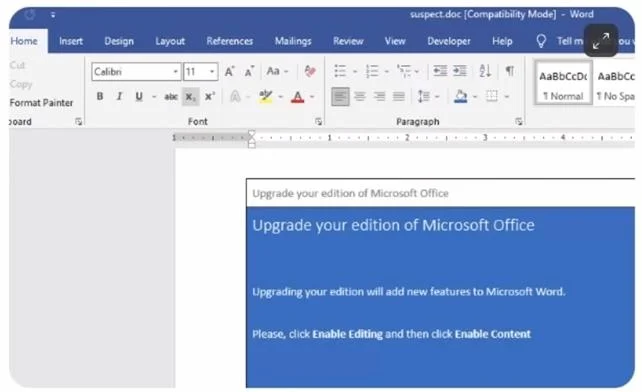
The following screenshot is of a malicious file. Why is there a notice about upgrading Microsoft Word?
The correct answer is D. To convince the user to enable macros. Malicious Office documents often display fake upgrade or compatibility warnings to manipulate users into enabling macros, which then execute the embedded malicious payload.
Question
The following screenshot is of a malicious file. Why is there a notice about upgrading Microsoft Word?
Exhibit
Options
- ATo distract the user from Defender alerts
- BTo prevent malicious code from executing
- CTo encourage the user to patch vulnerable software
- DTo convince the user to enable macros
How the community answered
(34 responses)- B3% (1)
- C3% (1)
- D94% (32)
Why each option
Malicious Office documents often display fake upgrade or compatibility warnings to manipulate users into enabling macros, which then execute the embedded malicious payload.
Defender alerts appear in the Windows notification area or Security Center, not inside the document itself, so an in-document notice would not distract from them.
Enabling macros does the opposite - it allows the malicious code to execute rather than preventing it.
The notice does not link to a real patch or update; it is deceptive content designed to manipulate the user, not inform them about vulnerabilities.
This is a well-known social engineering technique called a 'macro lure.' The fake Microsoft Word upgrade notice creates a false sense of legitimacy and urgency, tricking the victim into clicking 'Enable Content' or 'Enable Macros.' Once macros are enabled, the VBA payload executes automatically, often downloading and running additional malware.
Concept tested: Macro-based malware social engineering lure technique
Source: https://learn.microsoft.com/en-us/deployoffice/security/internet-macros-blocked
Topics
Community Discussion
No community discussion yet for this question.