
GCIH · Question #719
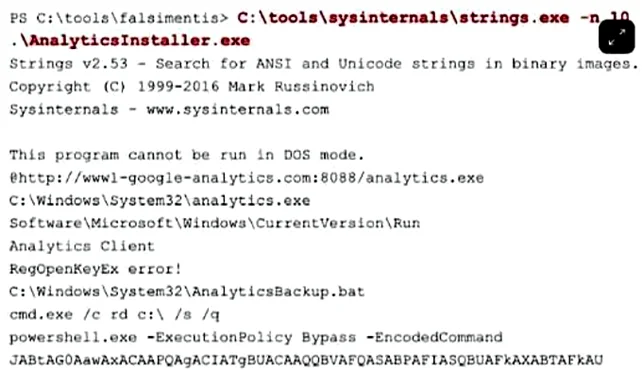
The provided screenshot shows output from running the SysInternals "Strings" command against a suspected malware executable. Which of the following strings indicate that the attacker is attempting…
The correct answer is C. Software\Microsoft\Windows\CurrentVersion\Run. The registry path Software\Microsoft\Windows\CurrentVersion\Run is a well-known Windows autostart location that malware writes to in order to survive reboots and maintain persistence.
Question
The provided screenshot shows output from running the SysInternals "Strings" command against a suspected malware executable. Which of the following strings indicate that the attacker is attempting to gain persistence on the target system?
Exhibit
Options
- BThis program cannot be run in DOS mode
- CSoftware\Microsoft\Windows\CurrentVersion\Run
- Dpowershell.exe -ExecutionPolicyBypass -EncodedCommand
How the community answered
(64 responses)- B14% (9)
- C80% (51)
- D6% (4)
Why each option
The registry path Software\Microsoft\Windows\CurrentVersion\Run is a well-known Windows autostart location that malware writes to in order to survive reboots and maintain persistence.
The string 'This program cannot be run in DOS mode' is a standard stub message embedded in the PE header of virtually every Windows executable and carries no malicious significance on its own.
The Run registry key under HKCU or HKLM causes any listed executable to launch automatically at every user login, making it one of the most commonly abused persistence mechanisms by malware. Its presence as a string in a suspected malware binary strongly indicates the executable is designed to write a value there, ensuring it re-executes after a reboot. This matches the MITRE ATT&CK technique T1547.001 - Registry Run Keys / Startup Folder.
The PowerShell string with -ExecutionPolicyBypass and -EncodedCommand indicates defense evasion and execution techniques, not persistence - it describes how a command is launched, not how the malware survives a reboot.
Concept tested: Windows Run registry key as persistence mechanism
Source: https://learn.microsoft.com/en-us/windows/win32/setupapi/run-and-runonce-registry-keys
Topics
Community Discussion
No community discussion yet for this question.