
GCIH · Question #695
Which of the following describes a suspicious event in the service data below? root@kali:~/volatility# ./vol.py -f ../mem/Desk005.vmem svcscan
The correct answer is D. YELLOW: Option -k should be followed by -p for svchost. On Windows, the legitimate svchost.exe (Service Host) process always launches with the -k flag followed by a service group name (e.g., svchost.exe -k netsvcs), and on modern Windows versions also includes -p. A svchost entry in Volatility's svcscan output that is missing the…
Question
Which of the following describes a suspicious event in the service data below? root@kali:~/volatility# ./vol.py -f ../mem/Desk005.vmem svcscan
Exhibit
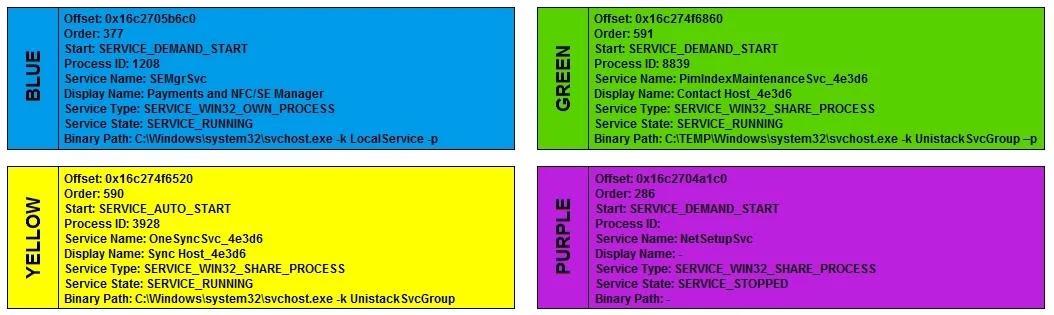
Options
- AGREEN: Executables should not be run from temporary folders
- BBLUE: Service names should be all capital letters
- CPURPLE: Services should not be in the STOPPED state
- DYELLOW: Option -k should be followed by -p for svchost
How the community answered
(27 responses)- A7% (2)
- B4% (1)
- C15% (4)
- D74% (20)
Explanation
On Windows, the legitimate svchost.exe (Service Host) process always launches with the -k flag followed by a service group name (e.g., svchost.exe -k netsvcs), and on modern Windows versions also includes -p. A svchost entry in Volatility's svcscan output that is missing the expected -k <ServiceGroup> (or shows -k without the correct companion argument) is a strong indicator of a rogue process masquerading as svchost - a classic malware technique. The other choices are invalid rules: executables do sometimes run from temporary folders legitimately (A), service names are not required to be all caps (B), and services in the STOPPED state is entirely normal (C) - many legitimate services are installed but not running.
Topics
Community Discussion
No community discussion yet for this question.