
GCIH · Question #544
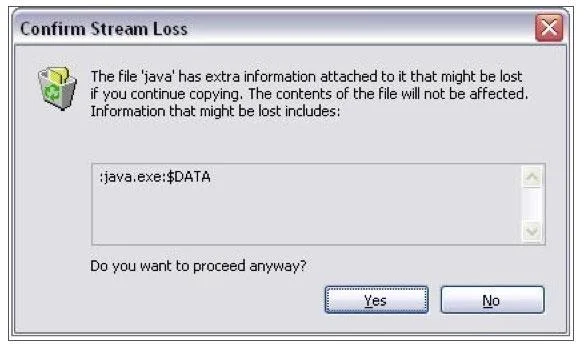
You are copying files from the C:\WINDOWS\system32 directory to a USB memory stick and encounter the pop-up shown in the image. What does this indicate?
The correct answer is C. The filesystem on the USB memory stick is not NTFS. When a file containing an alternate data stream on an NTFS filesystem is copied to a non NTFS filesystem, the stream data is lost. In this case, Windows has discovered that the steam attached to java.exe is about to be lost and is asking if you want to continue.
Question
You are copying files from the C:\WINDOWS\system32 directory to a USB memory stick and encounter the pop-up shown in the image. What does this indicate?
Exhibit
Options
- AThe system has not been scanned for rootkits
- BThe java.exe executable cannot be run from the memory USB stick
- CThe filesystem on the USB memory stick is not NTFS
- DThere is a virus embedded inside the java executable
- EJava is being used on the system and there is a resource conflict
How the community answered
(31 responses)- A3% (1)
- B3% (1)
- C87% (27)
- E6% (2)
Explanation
When a file containing an alternate data stream on an NTFS filesystem is copied to a non NTFS filesystem, the stream data is lost. In this case, Windows has discovered that the steam attached to java.exe is about to be lost and is asking if you want to continue.
Topics
Community Discussion
No community discussion yet for this question.