
FCSS_NST_SE-7.6 · Question #6
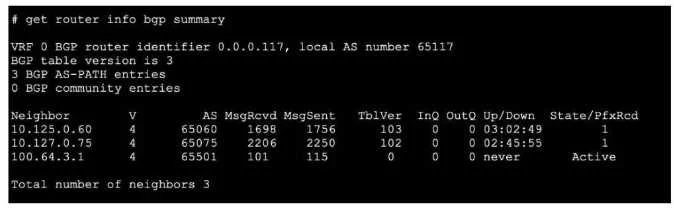
Refer to the exhibit, which shows the output of a BGP debug command. What can you conclude about the router in this scenario?
The correct answer is D. The BGP session with peer 10.127.0.75 is up. Option D is correct because BGP debug output explicitly logs the state transitions and session status for each peer. If the debug output shows the session with 10.127.0.75 in the Established state (or shows successful OPEN/KEEPALIVE exchanges completing), that is definitive…
Question
Refer to the exhibit, which shows the output of a BGP debug command. What can you conclude about the router in this scenario?
Exhibit
Options
- AThe router 100.64.3.1 needs to update the local AS number in its BGP configuration in order to
- BAn inbound route-map on local router is blocking the prefixes from neighbor 100.64.3.1.
- CAll of the neighbors displayed are part of a single BGP configuration on the local router with the
- DThe BGP session with peer 10.127.0.75 is up.
How the community answered
(48 responses)- A4% (2)
- B2% (1)
- C10% (5)
- D83% (40)
Explanation
Option D is correct because BGP debug output explicitly logs the state transitions and session status for each peer. If the debug output shows the session with 10.127.0.75 in the Established state (or shows successful OPEN/KEEPALIVE exchanges completing), that is definitive confirmation the session is up - you're reading it directly from the router's BGP state machine output.
Why the distractors are wrong:
- A is wrong because an AS number mismatch would generate a specific OPEN message error (e.g., "bad peer AS") and prevent the session from ever reaching Established - it wouldn't be a subtle background condition.
- B is wrong because an inbound route-map blocking prefixes affects the BGP table, not the session itself. The session would still be up; you'd see this in
show bgpor update debugging, not session-level debug output. - C is wrong because multiple neighbors appearing in debug output simply means the router has multiple BGP peers configured - it says nothing definitive about whether they share a single process, peer-group, or template.
Memory tip: In any BGP debug or show command, always anchor your conclusions to what the output explicitly states. "Session up" = Established state visible in the output. Don't infer configuration errors unless you see a specific error message - the debug output tells you exactly what's happening.
Topics
Community Discussion
No community discussion yet for this question.