
FCSS_NST_SE-7.6 · Question #1
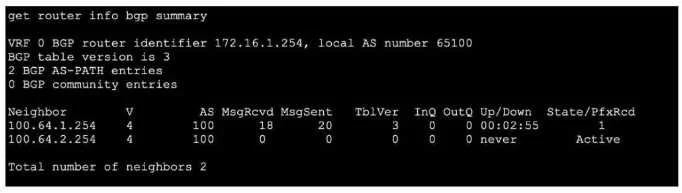
Refer to the exhibit, which shows the output of get router info bgp summary. Which two statements are true? (Choose two.)
The correct answer is A. The local ForliGate has received one prefix from BGP neighbor 100.64.1.254. C. The local FortiGate has received 18 packets from a BGP neighbor. Options A and C are correct based on what the get router info bgp summary output displays. The PfxRcd (Prefixes Received) column shows 1 next to neighbor 100.64.1.254, confirming one prefix was received and the session is fully established (A). The MsgRcvd column - which tracks…
Question
Refer to the exhibit, which shows the output of get router info bgp summary. Which two statements are true? (Choose two.)
Exhibit
Options
- AThe local ForliGate has received one prefix from BGP neighbor 100.64.1.254.
- BThe TCP connection with BGP neighbor 100.64.2.254 was successful.
- CThe local FortiGate has received 18 packets from a BGP neighbor.
- DThe local FortiGate is still calculating the prefixes received from BGP neighbor 100.64.2.264
How the community answered
(31 responses)- A81% (25)
- B6% (2)
- D13% (4)
Explanation
Options A and C are correct based on what the get router info bgp summary output displays. The PfxRcd (Prefixes Received) column shows 1 next to neighbor 100.64.1.254, confirming one prefix was received and the session is fully established (A). The MsgRcvd column - which tracks BGP messages/packets received - shows 18 for one of the neighbors, making C accurate.
B is wrong because neighbor 100.64.2.254 does not show a numeric PfxRcd value; instead it shows a state word like "Active", which means the TCP connection has not been successfully established - the router is still trying to connect.
D is wrong for two reasons: the IP address 100.64.2.264 is invalid (last octet exceeds 255, making it a nonsense address), and BGP does not have a "calculating" phase - PfxRcd either shows a count (session up) or a state string (session down).
Memory tip: In BGP summary output, think of it as a traffic light - a number in the State/PfxRcd column means the session is green (established, prefixes received), while a word (Active, Idle, Connect) means the session is red (not established). MsgRcvd tracks total BGP packets, not prefixes.
Topics
Community Discussion
No community discussion yet for this question.