
Fortinet
FCSS_LED_AR-7.6 · Question #59
FCSS_LED_AR-7.6 Question #59: Real Exam Question with Answer & Explanation
Sign in or unlock FCSS_LED_AR-7.6 to reveal the answer and full explanation for question #59. The question stem and answer options stay visible for context.
Question
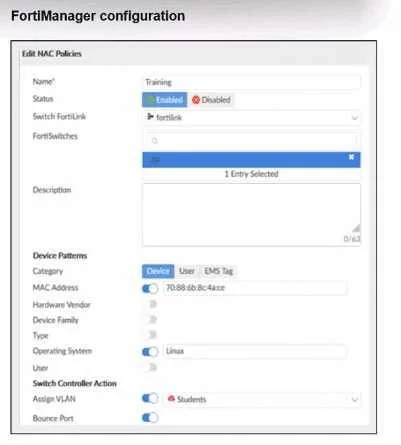
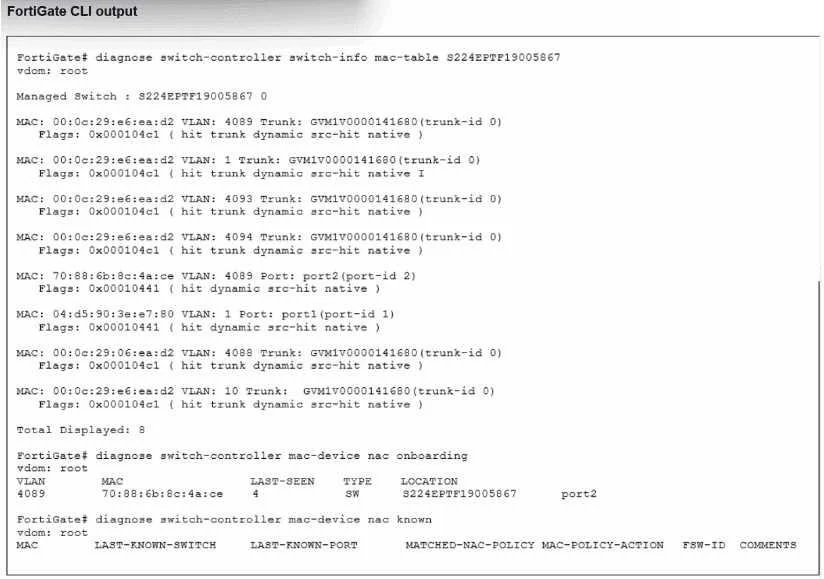
Refer to the exhibits. Examine the FortiManager configuration and FortiGate CLI output shown in the exhibit. The NAC feature is being tested with a device connected to port2 on managed FortiSwitch S224SPTF19005867. The NAC policy has been applied to port2, and traffic was generated from the test device. However, the traffic from the test device does not match the NAC policy and remains in the onboarding VLAN. What are two possible reasons why the test device is not being correctly classified by the NAC policy? (Choose two.)
Exhibits
Options
- ADevice detection is not enabled on VLAN 4089.
- BThe device operating system detected by FortiGate is not Linux.
- CManagement communication between FortiGate and FortiSwitch is down.
- DThe MAC address configured on the NAC policy is incorrect.
Unlock FCSS_LED_AR-7.6 to see the answer
You've previewed enough free FCSS_LED_AR-7.6 questions. Unlock FCSS_LED_AR-7.6 for full answers, explanations, the timed quiz mode, progress tracking, and the master PDF. Question stem and options stay visible so you can still see what's on the exam.