
FCSS_LED_AR-7.6 · Question #45
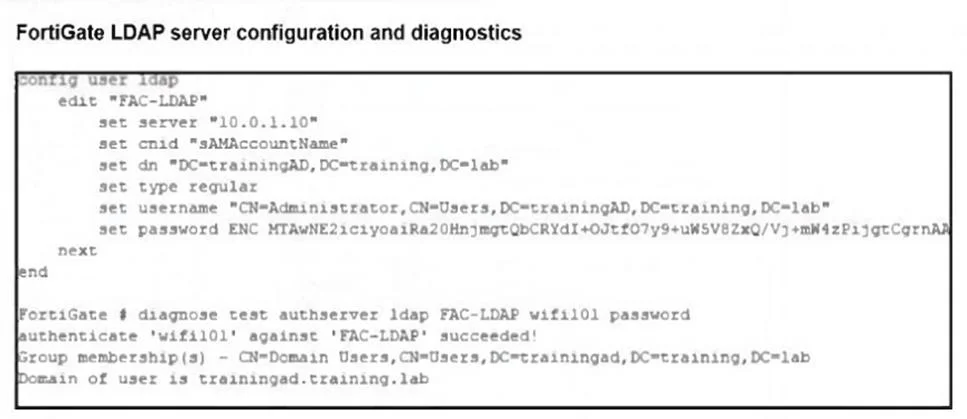
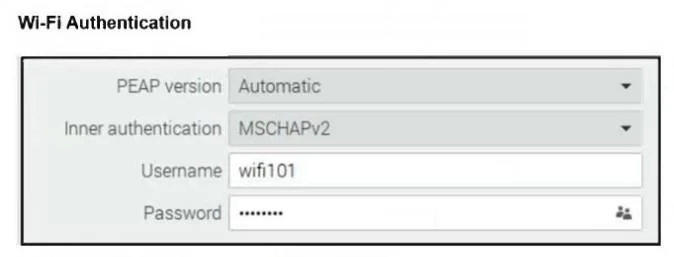
Refer to the exhibits. An LDAP server has been successfully configured on FortiGate, which forward LDAP authentication requests to a Windows Active Directory (AD) server. Wireless users report that…
The correct answer is A. FortiGate does not support MSCHAPv2 for LDAP authentication. FortiGate can forward LDAP authentication requests, but LDAP does not support MSCHAPv2 because it cannot validate NTLM password hashes. MSCHAPv2 requires a RADIUS server (such as FortiAuthenticator or NPS) to handle the challenge-response exchange with Active Directory. This is…
Question
Refer to the exhibits. An LDAP server has been successfully configured on FortiGate, which forward LDAP authentication requests to a Windows Active Directory (AD) server. Wireless users report that they are unable to authenticate. Upon troubleshooting, you find that authentication fails when using MSCHAPv2. What is the most likely reason for this issue?
Exhibits
Options
- AFortiGate does not support MSCHAPv2 for LDAP authentication.
- BThe FortiGate LDAP configuration is missing the correct Bind DN.
- CA firewall policy is missing an LDAP authentication rule.
- DThe Windows AD server requires LDAPS (LDAP over SSL) for authentication.
How the community answered
(53 responses)- A75% (40)
- B4% (2)
- C8% (4)
- D13% (7)
Explanation
FortiGate can forward LDAP authentication requests, but LDAP does not support MSCHAPv2 because it cannot validate NTLM password hashes. MSCHAPv2 requires a RADIUS server (such as FortiAuthenticator or NPS) to handle the challenge-response exchange with Active Directory. This is why wireless authentication with PEAP/MSCHAPv2 fails when configured directly against
Topics
Community Discussion
No community discussion yet for this question.