
FCSS_LED_AR-7.6 · Question #2
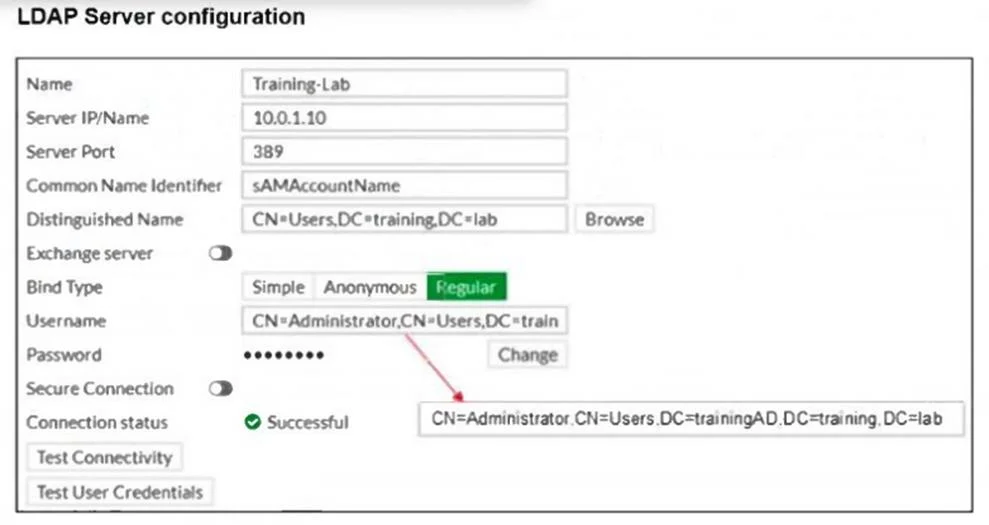
Refer to the exhibit. The exhibit shows an LDAP server configuration with the Username setting has been expanded to display its full content. The administrator has configured the LDAP settings on…
The correct answer is C. The Distinguished N setting is incorrectly configured, causing issues with user authentication. The Distinguished Name (DN) is misconfigured. In the FortiGate LDAP settings, it is set as CN=Users,DC=training,DC=lab, but the dsquery output shows the correct DN path should include DC=trainingAD (CN=Users,DC=trainingAD,DC=training,DC=lab). Because of this mismatch, FortiGate…
Question
Refer to the exhibit. The exhibit shows an LDAP server configuration with the Username setting has been expanded to display its full content. The administrator has configured the LDAP settings on FortiGate and is troubleshooting for authentication issues. As part of the troubleshooting steps, the administrator runs the command dsquery user -samid student on the Windows Active Directory (AD) server with an IP address 10.0.1.10 and received the output CN=student, CN=Users, DC=trainingAD, DC=training, DC=lab. Based on the dsquery output, which LDAP setting on FortiGate is misconfigured?
Exhibit
Options
- AThe Common Name Identifier is incorrectly set, causing authentication failures.
- BThe Bind Type is incorrectly configured, preventing FortiGate from connecting to the LDAP
- CThe Distinguished N setting is incorrectly configured, causing issues with user authentication.
- DSever IP/Name is misconfigured so FortiGate can't reach the LDAP server.
How the community answered
(45 responses)- A31% (14)
- B18% (8)
- C42% (19)
- D9% (4)
Explanation
The Distinguished Name (DN) is misconfigured. In the FortiGate LDAP settings, it is set as CN=Users,DC=training,DC=lab, but the dsquery output shows the correct DN path should include DC=trainingAD (CN=Users,DC=trainingAD,DC=training,DC=lab). Because of this mismatch, FortiGate cannot properly search for or authenticate AD users.
Topics
Community Discussion
No community discussion yet for this question.