
FCSS_EFW_AD-7.6 · Question #55
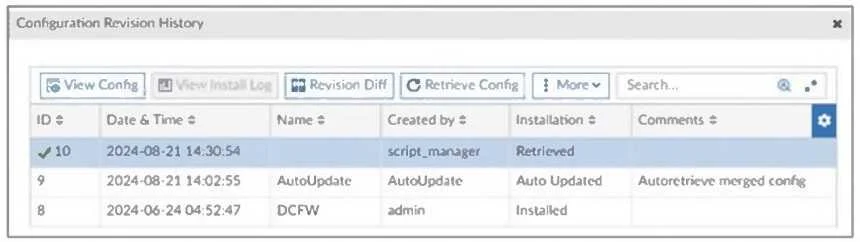
Refer to the exhibit, which shows a revision history window in the FortiManager device layer. The IT team is trying to identify the administrator responsible for the most recent update in the…
The correct answer is D. Find the user in the FortiManager system logs and use the type=script command to find the. The Configuration Revision History window in FortiManager shows that the most recent configuration change (ID 10) was created by script_manager with the action Retrieved. Since script_manager is a system-level script execution user, the IT team needs to find who actually…
Question
Refer to the exhibit, which shows a revision history window in the FortiManager device layer. The IT team is trying to identify the administrator responsible for the most recent update in the FortiGate device database. Which conclusion can you draw about this scenario?
Exhibit
Options
- AThis retrieved process was automatically triggered by a Remote FortiGate Directly (via CLI)
- BThe user script_manager is an API user from the Fortinet Developer Network (FDN) retrieving
- CTo identify the user who created the event, check it on the Configuration and Installation
- DFind the user in the FortiManager system logs and use the type=script command to find the
How the community answered
(53 responses)- A15% (8)
- B6% (3)
- C9% (5)
- D70% (37)
Explanation
The Configuration Revision History window in FortiManager shows that the most recent configuration change (ID 10) was created by script_manager with the action Retrieved. Since script_manager is a system-level script execution user, the IT team needs to find who actually triggered this script. This can be done by: Checking the FortiManager system logs for script execution events. Using the type=script filter to locate the administrator associated with the script execution.
Topics
Community Discussion
No community discussion yet for this question.