
FCSS_CDS_AR-7.6 · Question #65
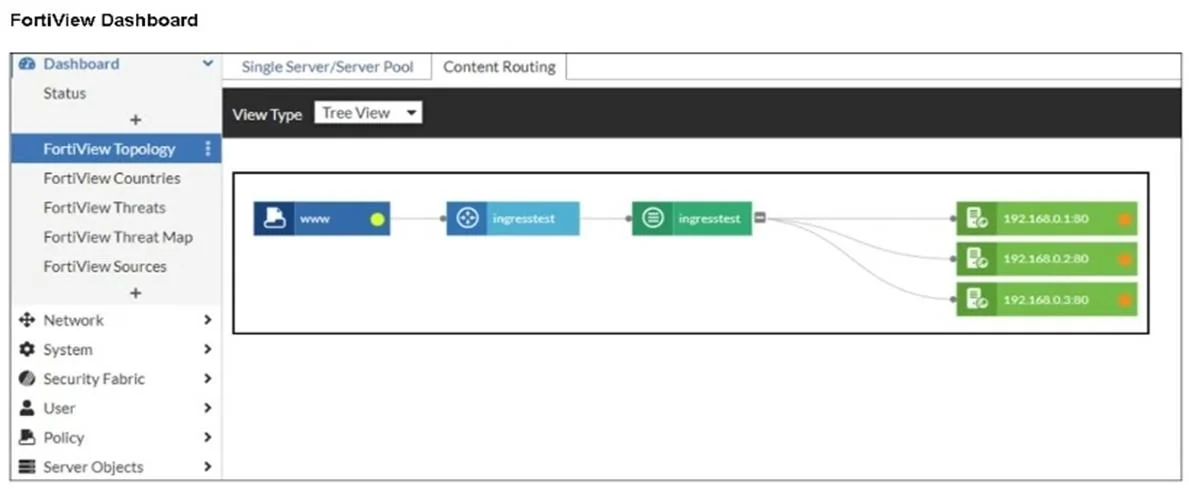
Refer to the exhibit. An administrator installed a FortiWeb ingress controller to protect a containerized web application. What is the reason for the status shown in FortiView?
The correct answer is B. The FortiWeb VM is missing a route to the node subnet. The FortiView dashboard shows the backend pods (192.168.0.x:80) as unreachable (orange indicators). This happens when the FortiWeb VM does not have a proper route to the node subnet, preventing it from forwarding traffic to the containerized application endpoints.
Question
Refer to the exhibit. An administrator installed a FortiWeb ingress controller to protect a containerized web application. What is the reason for the status shown in FortiView?
Exhibit
Options
- AThe manifest file deployed is configured with the wrong node IP addresses.
- BThe FortiWeb VM is missing a route to the node subnet.
- CThe load balancing type is not set to round-robin.
- DThe SDN connector is not authenticated correctly.
How the community answered
(35 responses)- A9% (3)
- B71% (25)
- C17% (6)
- D3% (1)
Explanation
The FortiView dashboard shows the backend pods (192.168.0.x:80) as unreachable (orange indicators). This happens when the FortiWeb VM does not have a proper route to the node subnet, preventing it from forwarding traffic to the containerized application endpoints.
Topics
Community Discussion
No community discussion yet for this question.