
FCP_FWB_AD-7.4 · Question #72
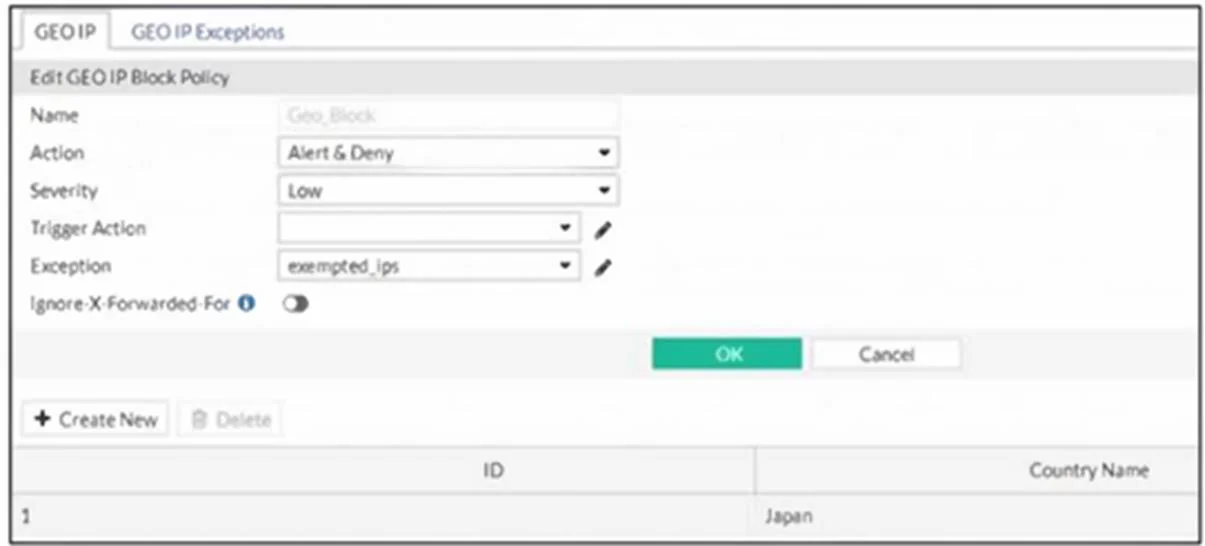
Refer to the exhibit. FortiWeb is configured to block traffic from Japan to a web application server. However, in the logs, the administrator is seeing traffic allowed from an IP address that is…
The correct answer is B. If the IP address has an IP reputation exception, remove it. D. Configure the IP address as a blocklisted IP address. If the IP address is listed in an exception group, removing it ensures the geo-block policy is Manually blocklisting the IP address guarantees FortiWeb will deny access from that specific source, regardless of geo-location exceptions.
Question
Refer to the exhibit. FortiWeb is configured to block traffic from Japan to a web application server. However, in the logs, the administrator is seeing traffic allowed from an IP address that is geo- located in Japan. Which two actions can the administrator take to solve this problem? (Choose two.)
Exhibit
Options
- AIf the IP address has a geo IP reputation exception, remove it.
- BIf the IP address has an IP reputation exception, remove it.
- CManually update the geo-location IP addresses for Japan.
- DConfigure the IP address as a blocklisted IP address.
How the community answered
(24 responses)- A8% (2)
- B71% (17)
- C21% (5)
Explanation
If the IP address is listed in an exception group, removing it ensures the geo-block policy is Manually blocklisting the IP address guarantees FortiWeb will deny access from that specific source, regardless of geo-location exceptions.
Topics
Community Discussion
No community discussion yet for this question.