
FCP_FWB_AD-7.4 · Question #27
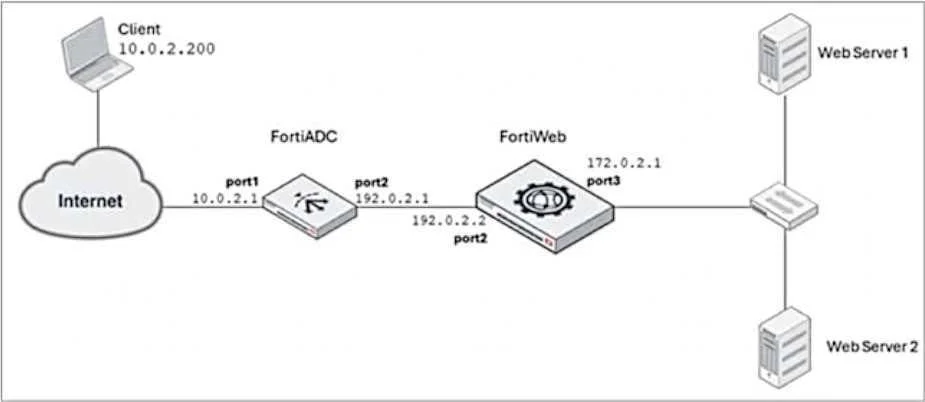
Refer to the exhibit. FortiADC is applying SNAT to all inbound traffic going to the servers. When an attack occurs, FortiWeb blocks traffic based on the 192.0.2.1 source IP address, which belongs to…
The correct answer is C. Place FortiWeb in front of FortiADC. D. Enable and configure the Use X-Forwarded-For setting on FortiWeb. Place FortiWeb in front of FortiADC: This configuration change places FortiWeb between the client and FortiADC, so that FortiWeb can directly inspect and protect the incoming traffic before FortiADC applies SNAT (Source Network Address Translation). By placing FortiWeb in…
Question
Refer to the exhibit. FortiADC is applying SNAT to all inbound traffic going to the servers. When an attack occurs, FortiWeb blocks traffic based on the 192.0.2.1 source IP address, which belongs to FortiADC. This setup is breaking all connectivity and genuine clients are not able to access the servers. What can the administrator do to avoid this problem? (Choose two.)
Exhibit
Options
- AEnable and configure the Preserve Client IP setting on the client.
- BNo special configuration is required; connectivity will be re-established for all clients after the set
- CPlace FortiWeb in front of FortiADC.
- DEnable and configure the Use X-Forwarded-For setting on FortiWeb.
How the community answered
(50 responses)- A12% (6)
- B18% (9)
- C70% (35)
Explanation
Place FortiWeb in front of FortiADC: This configuration change places FortiWeb between the client and FortiADC, so that FortiWeb can directly inspect and protect the incoming traffic before FortiADC applies SNAT (Source Network Address Translation). By placing FortiWeb in front, it will have access to the real client IP addresses, and it will be able to properly identify and handle attack traffic without blocking legitimate client traffic. Enable and configure the Use X-Forwarded-For setting on FortiWeb: This setting allows FortiWeb to extract the original client IP address from the X-Forwarded-For header in the HTTP request, which is inserted by FortiADC when performing SNAT. With this setting enabled, FortiWeb will be able to block traffic based on the original client IP address rather than the SNATed IP address (192.0.2.1), preserving the accuracy of the security measures.
Topics
Community Discussion
No community discussion yet for this question.