
FCP_FML_AD-7.4 · Question #9
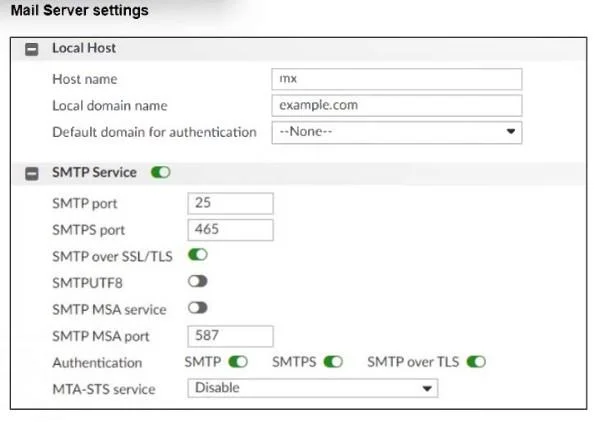
Refer to the exhibit, which shows the mail server settings of a FortiMail device: What are two ways this FortiMail device will handle connections? (Choose two.)
The correct answer is B. FortiMail will accept SMTPS connections. D. FortiMail will support the STARTTLS extension. FortiMail will accept SMTPS connections. The SMTPS port (465) is enabled and "SMTPS" authentication is turned on, so it will listen for and accept implicit-SSL SMTP on port 465. FortiMail will support the STARTTLS extension. With "SMTP over SSL/TLS" enabled on port 25, the…
Question
Refer to the exhibit, which shows the mail server settings of a FortiMail device:
What are two ways this FortiMail device will handle connections? (Choose two.)
Exhibit
Options
- AFortiMail will drop any inbound plaintext SMTP connection.
- BFortiMail will accept SMTPS connections.
- CFortiMail will enforce SMTPS on all outbound sessions.
- DFortiMail will support the STARTTLS extension.
How the community answered
(62 responses)- A13% (8)
- B81% (50)
- C6% (4)
Explanation
FortiMail will accept SMTPS connections. The SMTPS port (465) is enabled and "SMTPS" authentication is turned on, so it will listen for and accept implicit-SSL SMTP on port 465. FortiMail will support the STARTTLS extension. With "SMTP over SSL/TLS" enabled on port 25, the server advertises and accepts STARTTLS for opportunistic TLS upgrades on plaintext SMTP sessions.
Topics
Community Discussion
No community discussion yet for this question.