
Fortinet
FCP_FML_AD-7.4 · Question #10
Refer to the exhibit, which displays the Mail Settings page of a FortiMail device running in gateway mode. In addition to selecting Check External Domain in the MTA-STS service field, what else must…
The correct answer is C. Enable MTA-STS in the associated TLS profile. You must enable MTA-STS in whatever TLS profile your outbound IP policy uses-only then will FortiMail honor the "Check External Domain" setting.
Initial Setup and Configuration
Question
Refer to the exhibit, which displays the Mail Settings page of a FortiMail device running in gateway mode. In addition to selecting Check External Domain in the MTA-STS service field, what else must an administrator do to enable MTA-STS?
Exhibit
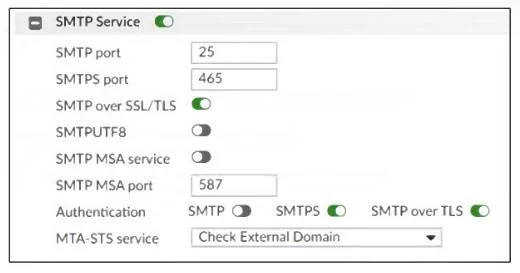
Options
- AEnable MTA-STS action in the appropriate inbound recipient policy.
- BEnable secure authentication in the associated SMTP authentication profile.
- CEnable MTA-STS in the associated TLS profile.
- DEnable SMTPUTF8 support in the mail server settings.
How the community answered
(58 responses)- A5% (3)
- B2% (1)
- C84% (49)
- D9% (5)
Explanation
You must enable MTA-STS in whatever TLS profile your outbound IP policy uses-only then will FortiMail honor the "Check External Domain" setting.
Topics
#MTA-STS#TLS profile#gateway mode#secure mail transport
Community Discussion
No community discussion yet for this question.