
FCP_FGT_AD-7.6 · Question #79
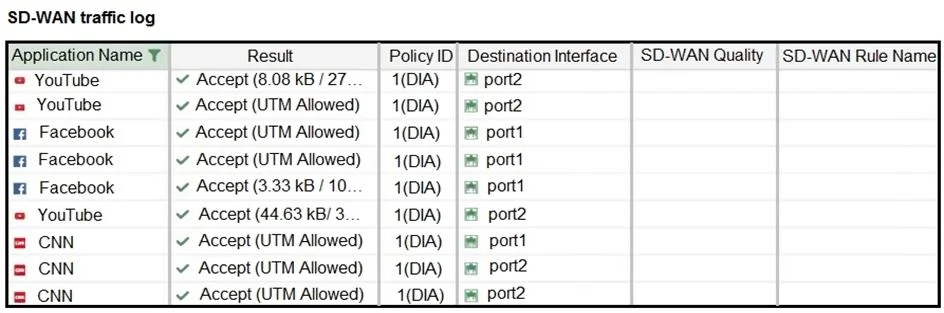
Refer to the exhibit. The administrator configured SD-WAN rules and set the FortiGate traffic log page to display SD-WAN-specific columns: SD-WAN Quality and SD- WAN Rule Name. FortiGate allows the…
The correct answer is C. FortiGate load balanced the traffic according to the implicit SD-WAN rule. Option C is correct because FortiGate's SD-WAN has an implicit rule that acts as a catch-all when no explicitly configured SD-WAN rule matches the traffic - this implicit rule has no user-defined name, so the "SD-WAN Rule Name" column in the traffic log will be blank even…
Question
Refer to the exhibit. The administrator configured SD-WAN rules and set the FortiGate traffic log page to display SD-WAN-specific columns: SD-WAN Quality and SD- WAN Rule Name. FortiGate allows the traffic according to policy ID 1 placed at the top. This is the policy that allows SD-WAN traffic. Despite these settings, the traffic logs do not show the name of the SD-WAN rule used to steer those traffic flows. What could be the reason?
Exhibit
Options
- ASD-WAN rule names do not appear immediately. The administrator must refresh the page.
- BThere is no application control profile applied to the firewall policy.
- CFortiGate load balanced the traffic according to the implicit SD-WAN rule.
- DDestinations in the SD-WAN rules are configured for each application, but feature visibility is not
How the community answered
(35 responses)- A17% (6)
- B3% (1)
- C71% (25)
- D9% (3)
Explanation
Option C is correct because FortiGate's SD-WAN has an implicit rule that acts as a catch-all when no explicitly configured SD-WAN rule matches the traffic - this implicit rule has no user-defined name, so the "SD-WAN Rule Name" column in the traffic log will be blank even though SD-WAN is actively steering the traffic.
Why the distractors are wrong:
- A is wrong - traffic log entries populate in real time; there is no display delay for SD-WAN rule names specifically.
- B is wrong - an application control profile is a security feature unrelated to whether SD-WAN rule names appear in logs; its absence does not suppress that column.
- D is wrong - feature visibility affects whether SD-WAN columns are available to add, but the admin already successfully added those columns, so visibility is not the issue here.
Memory tip: Think of the implicit SD-WAN rule like a default gateway route - it catches everything that doesn't match a more specific rule, and just like a default route has no descriptive name, the implicit SD-WAN rule logs no rule name. If you see a blank "SD-WAN Rule Name" with traffic flowing, suspect the implicit rule fired.
Topics
Community Discussion
No community discussion yet for this question.